ChainTest Report with Cucumber and TestNG

HOME

<dependency>
      <groupId>com.aventstack</groupId>
      <artifactId>chaintest-cucumber-jvm</artifactId>
      <version>${chaintest.cucumberjvm.version}</version>
      <scope>provided</scope>
 </dependency>

<project xmlns="http://maven.apache.org/POM/4.0.0" xmlns:xsi="http://www.w3.org/2001/XMLSchema-instance"
  xsi:schemaLocation="http://maven.apache.org/POM/4.0.0 http://maven.apache.org/xsd/maven-4.0.0.xsd">
  <modelVersion>4.0.0</modelVersion>

  <groupId>com.example</groupId>
  <artifactId>ChainTestReport_Cucumber_TestNG_Demo</artifactId>
  <version>1.0-SNAPSHOT</version>
  <packaging>jar</packaging>

  <name>ChainTestReport_Cucumber_TestNG_Demo</name>
  <url>http://maven.apache.org</url>

  <properties>
    <project.build.sourceEncoding>UTF-8</project.build.sourceEncoding>
    <cucumber.version>7.18.1</cucumber.version>
    <selenium.version>4.25.0</selenium.version>
    <testng.version>7.10.2</testng.version>
    <chaintest.cucumberjvm.version>1.0.11</chaintest.cucumberjvm.version>
    <apache.common.version>2.4</apache.common.version>
    <maven.compiler.plugin.version>3.13.0</maven.compiler.plugin.version>
    <maven.surefire.plugin.version>3.3.1</maven.surefire.plugin.version>
    <maven.compiler.source.version>17</maven.compiler.source.version>
    <maven.compiler.target.version>17</maven.compiler.target.version>
    <maven.cucumber.reporting.version>5.8.2</maven.cucumber.reporting.version>
  </properties>

  <dependencies>

    <dependency>
      <groupId>io.cucumber</groupId>
      <artifactId>cucumber-java</artifactId>
      <version>${cucumber.version}</version>
    </dependency>

    <dependency>
      <groupId>io.cucumber</groupId>
      <artifactId>cucumber-testng</artifactId>
      <version>${cucumber.version}</version>
      <scope>test</scope>
    </dependency>

    <!-- Selenium -->
    <dependency>
      <groupId>org.seleniumhq.selenium</groupId>
      <artifactId>selenium-java</artifactId>
      <version>${selenium.version}</version>
    </dependency>

    <!-- TestNG -->
    <dependency>
      <groupId>org.testng</groupId>
      <artifactId>testng</artifactId>
      <version>${testng.version}</version>
      <scope>test</scope>
    </dependency>

    <dependency>
      <groupId>com.aventstack</groupId>
      <artifactId>chaintest-cucumber-jvm</artifactId>
      <version>${chaintest.cucumberjvm.version}</version>
      <scope>provided</scope>
    </dependency>

  </dependencies>

  <build>
    <plugins>
      <plugin>
        <groupId>org.apache.maven.plugins</groupId>
        <artifactId>maven-compiler-plugin</artifactId>
        <version>${maven.compiler.plugin.version}</version>
        <configuration>
          <source>${maven.compiler.source.version}</source>
          <target>${maven.compiler.target.version}</target>
        </configuration>
      </plugin>
      <plugin>
        <groupId>org.apache.maven.plugins</groupId>
        <artifactId>maven-surefire-plugin</artifactId>
        <version>${maven.surefire.plugin.version}</version>
        <configuration>
          <testFailureIgnore>true</testFailureIgnore>
          <suiteXmlFiles>
            <suiteXmlFile>testng.xml</suiteXmlFile>
          </suiteXmlFiles>
        </configuration>
      </plugin>

    </plugins>
  </build>
</project>

Feature: Login to HRM Application

  Background:
    Given User is on HRMLogin page "https://opensource-demo.orangehrmlive.com/"

  @ValidCredentials
  Scenario: Login with valid credentials

    When User enters username as "Admin" and password as "admin123"
    Then User should be able to login successfully and new page open

  @InvalidCredentials
  Scenario Outline: Login with invalid credentials

    When User enters username as "<username>" and password as "<password>"
    Then User should be able to see error message "<errorMessage>"

    Examples:
      | username   | password  | errorMessage           |
      | Admin      | admin12$$ | Invalid credentials    |
      | admin$$    | admin123  | Invalid credentials    |
      | abc123     | xyz$$     | Invalid credentials    |

  @MissingUsername
  Scenario: Login with blank username - FailedTest

    When User enters username as " " and password as "admin123"
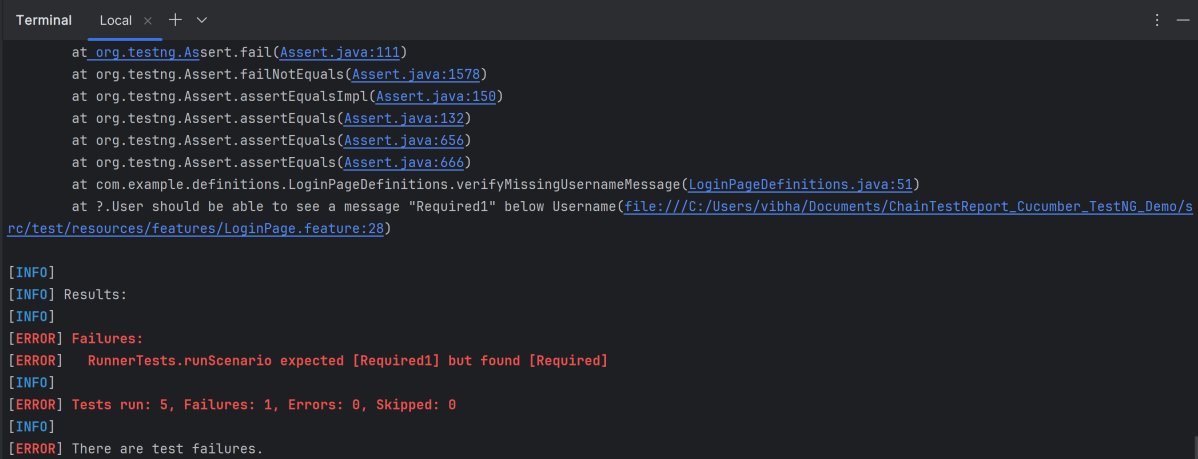
    Then User should be able to see a message "Required1" below Username

package com.example.actions;

import com.example.locators.LoginPageLocators;
import org.openqa.selenium.support.PageFactory;
import com.example.utils.HelperClass;


public class LoginPageActions {

    LoginPageLocators loginPageLocators = null;

    public LoginPageActions() {

        this.loginPageLocators = new LoginPageLocators();
        PageFactory.initElements(HelperClass.getDriver(), loginPageLocators);
    }

    // Get the error message when username is blank
    public String getMissingUsernameText() {
        return loginPageLocators.missingUsernameErrorMessage.getText();
    }

    // Get the Error Message
    public String getErrorMessage() {
        return loginPageLocators.errorMessage.getText();
    }

    public void login(String strUserName, String strPassword) {

        // Fill user name
        loginPageLocators.userName.sendKeys(strUserName);

        // Fill password
        loginPageLocators.password.sendKeys(strPassword);

        // Click Login button
        loginPageLocators.login.click();

    }
}

package com.example.actions;

import com.example.locators.HomePageLocators;
import org.openqa.selenium.support.PageFactory;
import com.example.utils.HelperClass;

public class HomePageActions {

    HomePageLocators homePageLocators = null;

    public HomePageActions() {

        this.homePageLocators = new HomePageLocators();
        PageFactory.initElements(HelperClass.getDriver(),homePageLocators);
    }

    public String getHomePageText() {
        System.out.println("Heading :" + homePageLocators.homePageUserName.getText());
        return homePageLocators.homePageUserName.getText();
    }

}
package com.example.locators;

import org.openqa.selenium.WebElement;
import org.openqa.selenium.support.FindBy;

public class LoginPageLocators {

    @FindBy(name = "username")
    public WebElement userName;

    @FindBy(name = "password")
    public WebElement password;

    @FindBy(xpath = "//*[@id='app']/div[1]/div/div[1]/div/div[2]/div[2]/form/div[1]/div/span")
    public WebElement missingUsernameErrorMessage;

    @FindBy(xpath = "//*[@id='app']/div[1]/div/div[1]/div/div[2]/div[2]/form/div[3]/button")
    public WebElement login;

    @FindBy(xpath = "//*[@id='app']/div[1]/div/div[1]/div/div[2]/div[2]/div/div[1]/div[1]/p")
    public  WebElement errorMessage;

}

package com.example.locators;
import org.openqa.selenium.WebElement;
import org.openqa.selenium.support.FindBy;

public class HomePageLocators {

    @FindBy(xpath = "//span[@class='oxd-topbar-header-breadcrumb']/h6")

    public  WebElement homePageUserName;

}

package com.example.utils;

import java.time.Duration;
import org.openqa.selenium.WebDriver;
import org.openqa.selenium.chrome.ChromeDriver;
import org.openqa.selenium.chrome.ChromeOptions;

public class HelperClass {

    private static HelperClass helperClass;

    private static WebDriver driver;
    public final static int TIMEOUT = 5;

    private HelperClass() {

        ChromeOptions options = new ChromeOptions();
        options.addArguments("--start-maximized");
        driver = new ChromeDriver(options);
        driver.manage().timeouts().implicitlyWait(Duration.ofSeconds(TIMEOUT));
    }

    public static void openPage(String url) {
        driver.get(url);
    }

    public static WebDriver getDriver() {
        return driver;
    }

    public static void setUpDriver() {

        if (helperClass==null) {
            helperClass = new HelperClass();
        }
    }

    public static void tearDown() {

        if(driver!=null) {
            driver.quit();
        }

        helperClass = null;
    }

}

package com.example.definitions;

import com.example.actions.HomePageActions;
import com.example.actions.LoginPageActions;

import io.cucumber.java.en.Given;
import io.cucumber.java.en.Then;
import io.cucumber.java.en.When;
import org.testng.Assert;
import com.example.utils.HelperClass;

public class LoginPageDefinitions {

    LoginPageActions objLogin = new LoginPageActions();
    HomePageActions objHomePage = new HomePageActions();

    @Given("User is on HRMLogin page {string}")
    public void loginTest(String url) {

        HelperClass.openPage(url);

    }

    @When("User enters username as {string} and password as {string}")
    public void goToHomePage(String userName, String passWord) {

        // login to application
        objLogin.login(userName, passWord);

    }

    @Then("User should be able to login successfully and new page open")
    public void verifyLogin() {

        // Verify home page
        Assert.assertTrue(objHomePage.getHomePageText().contains("Dashboard"));

    }

    @Then("User should be able to see error message {string}")
    public void verifyErrorMessage(String expectedErrorMessage) {

        // Verify error message
        Assert.assertEquals(objLogin.getErrorMessage(),expectedErrorMessage);

    }

    @Then("User should be able to see a message {string} below Username")
    public void verifyMissingUsernameMessage(String message) {

        Assert.assertEquals(objLogin.getMissingUsernameText(),message);
    }

}

package com.example.definitions;
import org.openqa.selenium.OutputType;
import org.openqa.selenium.TakesScreenshot;

import io.cucumber.java.After;
import io.cucumber.java.Before;
import io.cucumber.java.Scenario;
import com.example.utils.HelperClass;

public class Hooks {

    @Before
    public static void setUp() {

        HelperClass.setUpDriver();
    }

    @After
    public static void tearDown(Scenario scenario) {

        //validate if scenario has failed
        if(scenario.isFailed()) {
            final byte[] screenshot = ((TakesScreenshot) HelperClass.getDriver()).getScreenshotAs(OutputType.BYTES);
            scenario.attach(screenshot, "image/png", scenario.getName());
        }

        HelperClass.tearDown();
    }
}

package com.example.runner;

import io.cucumber.testng.AbstractTestNGCucumberTests;
import io.cucumber.testng.CucumberOptions;

@CucumberOptions(features = "src/test/resources/features/LoginPage.feature",
        glue = "com.example.definitions",
        plugin = {
                "pretty",
                "com.aventstack.chaintest.plugins.ChainTestCucumberListener:"
        }
)
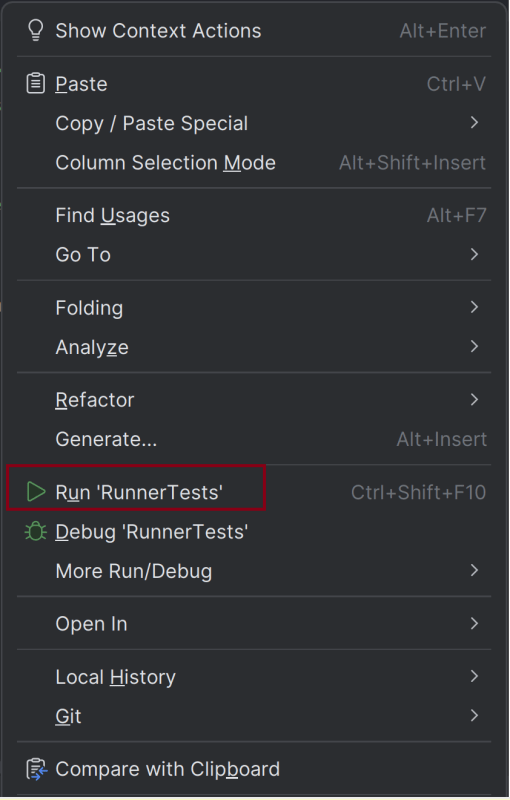
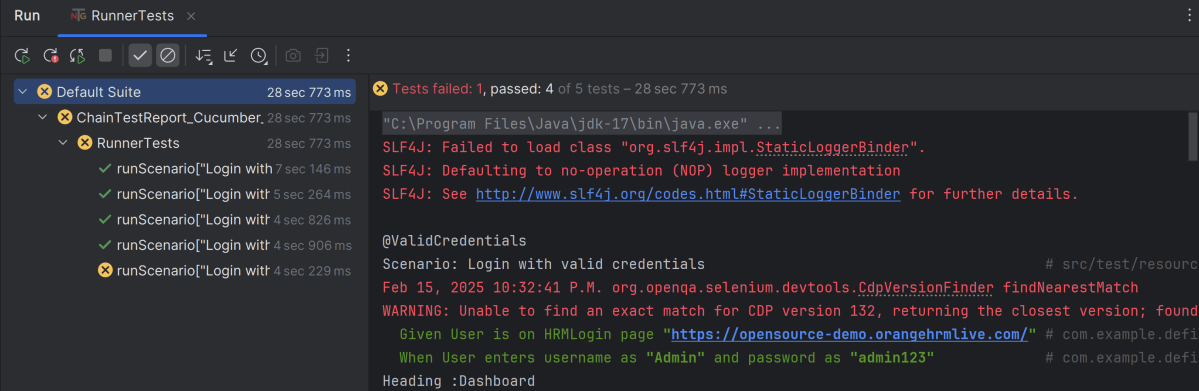
public class RunnerTests extends AbstractTestNGCucumberTests {
}

@CucumberOptions(plugin = { 
  "com.aventstack.chaintest.plugins.ChainTestCucumberListener:" 
})

# chaintest configuration
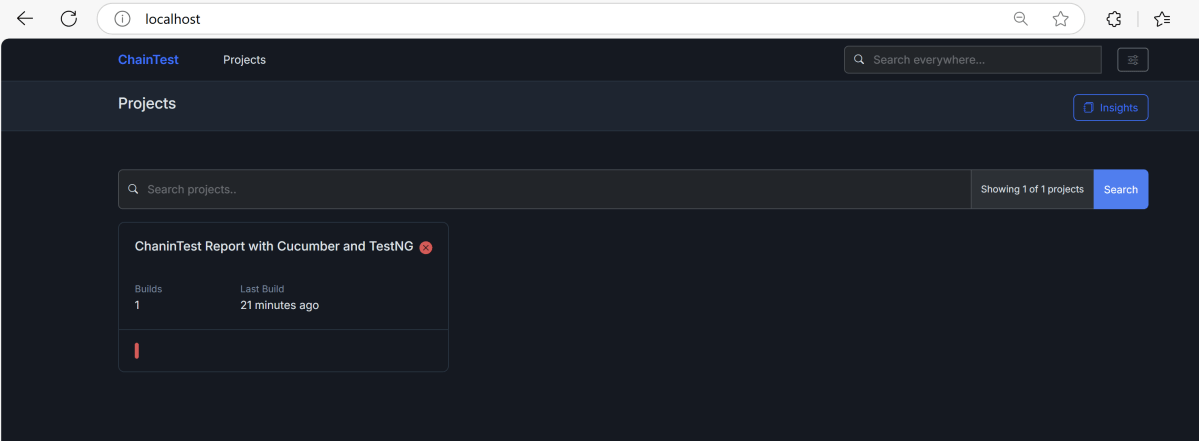
chaintest.project.name= ChaninTest Report with Cucumber and TestNG

# generators:
## chainlp
chaintest.generator.chainlp.enabled=true
chaintest.generator.chainlp.class-name=com.aventstack.chaintest.generator.ChainLPGenerator
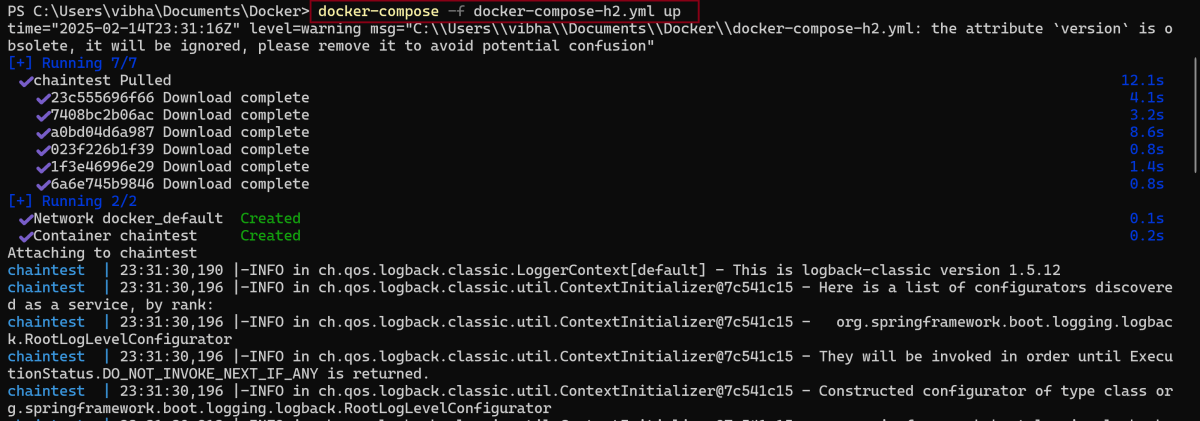
chaintest.generator.chainlp.host.url=http://localhost/
chaintest.generator.chainlp.client.request-timeout-s=30
chaintest.generator.chainlp.client.expect-continue=false
chaintest.generator.chainlp.client.max-retries=3

## simple
chaintest.generator.simple.enabled=true
chaintest.generator.simple.document-title=chaintest
chaintest.generator.simple.class-name=com.aventstack.chaintest.generator.ChainTestSimpleGenerator
chaintest.generator.simple.output-file=target/chaintest/Index.html
chaintest.generator.simple.offline=false
chaintest.generator.simple.dark-theme=true
chaintest.generator.simple.datetime-format=yyyy-MM-dd hh:mm:ss a
chaintest.generator.simple.js=
chaintest.generator.simple.css=

## email
chaintest.generator.email.enabled=true
chaintest.generator.email.class-name=com.aventstack.chaintest.generator.ChainTestEmailGenerator
chaintest.generator.email.output-file=target/chaintest/Email.html
chaintest.generator.email.datetime-format=yyyy-MM-dd hh:mm:ss a

<?xml version="1.0" encoding="UTF-8"?>
<!DOCTYPE suite SYSTEM "https://testng.org/testng-1.0.dtd">
<suite name="Suite">
    <test  name="Cucumber with TestNG Test">
        <classes>
            <class name="com.example.runner.RunnerTests"/>
        </classes>
    </test> <!-- Test -->
</suite> <!-- Suite -->

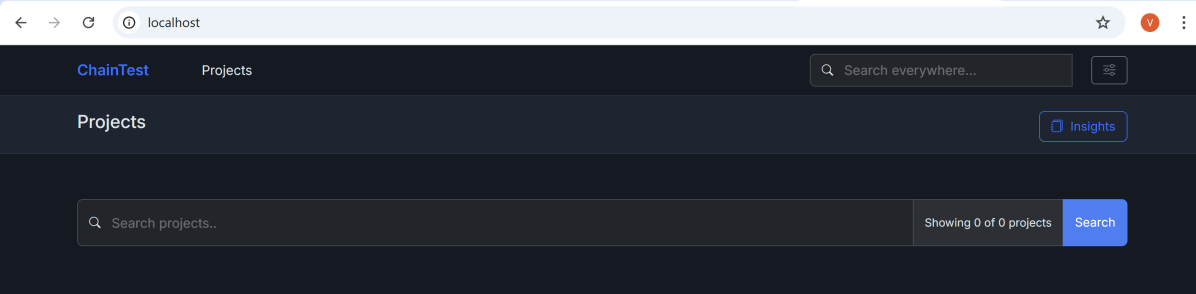
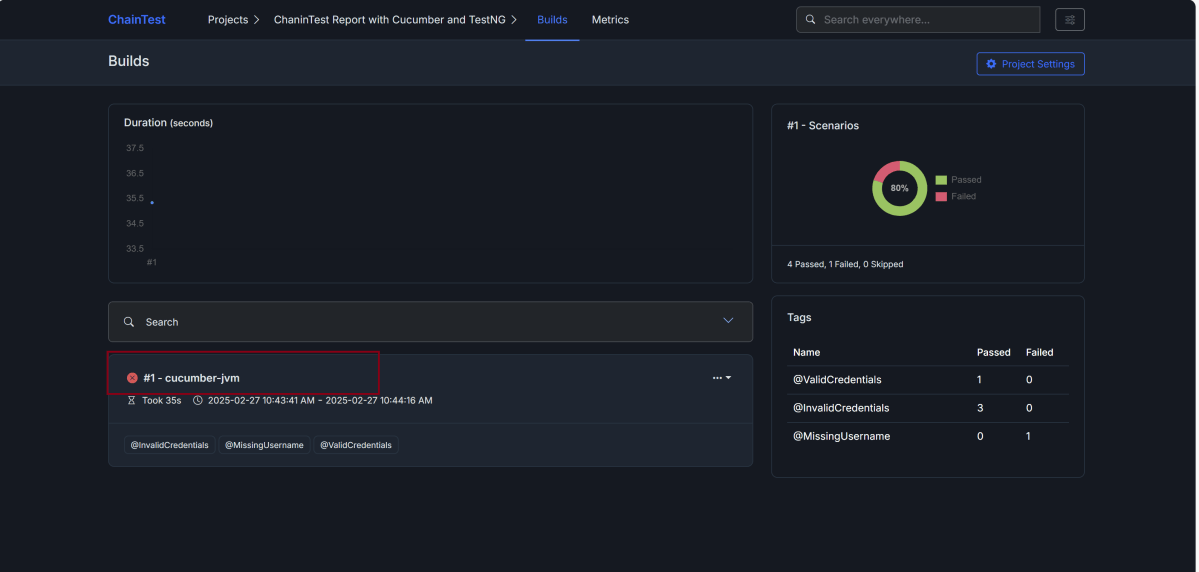
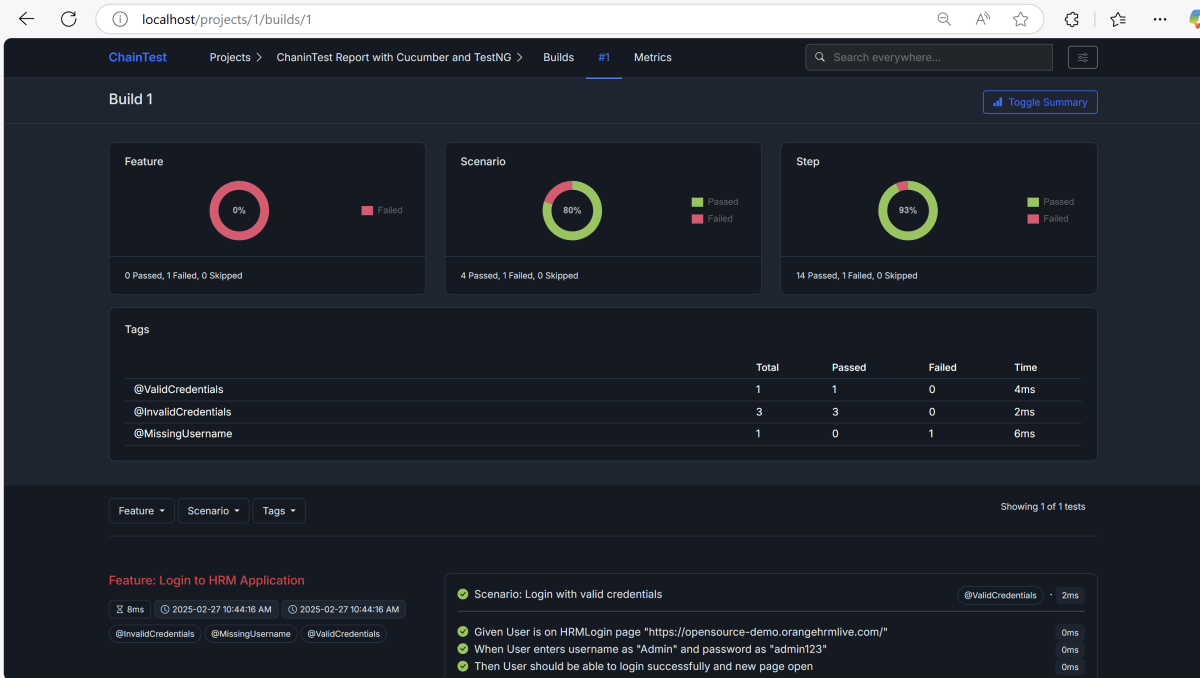
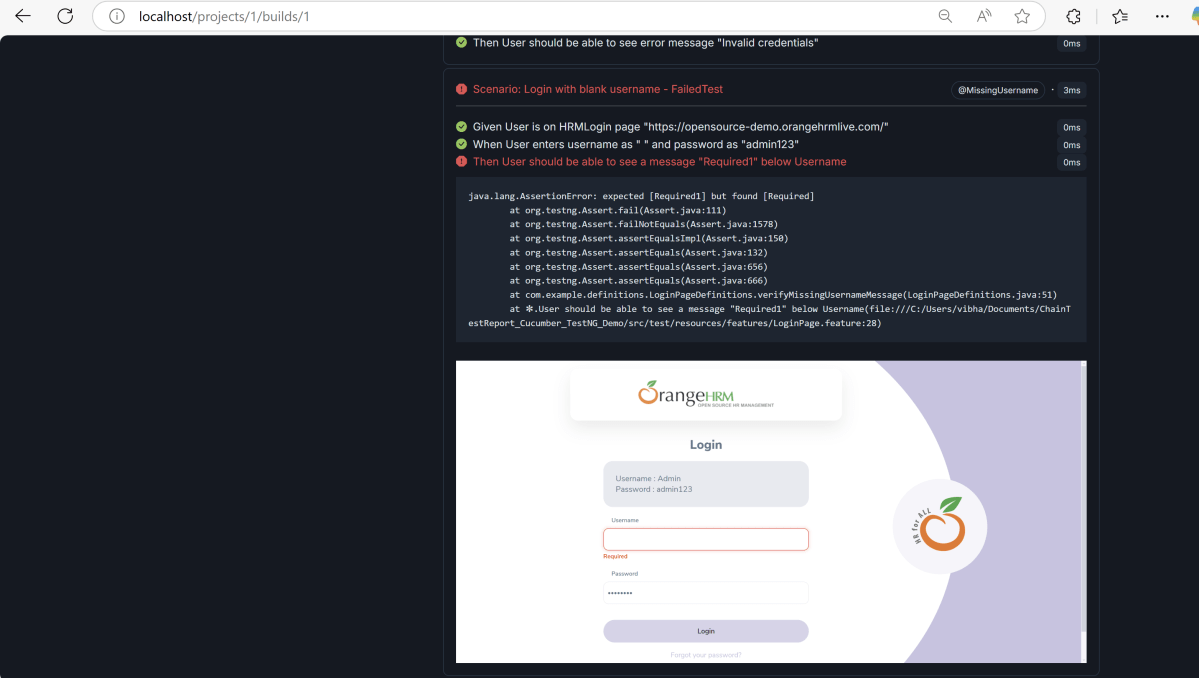
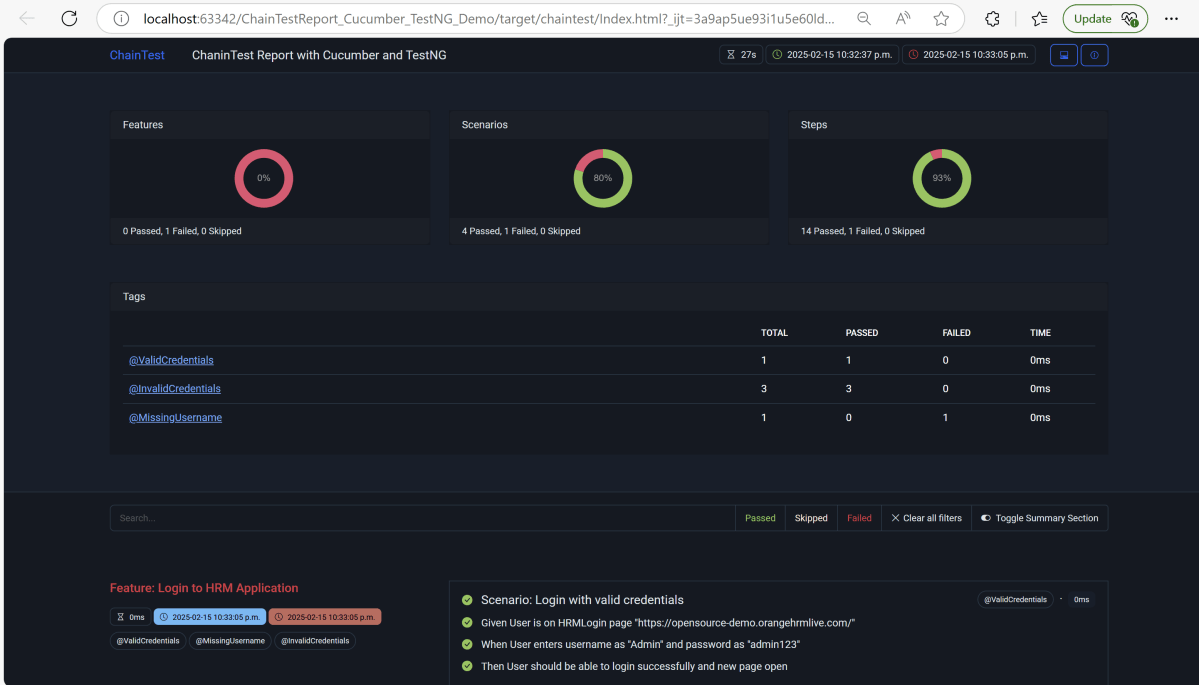
This report contains the high level summary of the test execution.

mvn clean test

Replacement of Extent Report: ChainTest Report with Selenium and TestNG

HOME

<dependency>
  <groupId>com.aventstack</groupId>
  <artifactId>chaintest-testng</artifactId>
  <version>${chaintest.testng.version}</version>
</dependency>

<project xmlns="http://maven.apache.org/POM/4.0.0" xmlns:xsi="http://www.w3.org/2001/XMLSchema-instance"
  xsi:schemaLocation="http://maven.apache.org/POM/4.0.0 http://maven.apache.org/xsd/maven-4.0.0.xsd">
  <modelVersion>4.0.0</modelVersion>

  <groupId>com.example</groupId>
  <artifactId>ChainTest_TestNG_Demo</artifactId>
  <version>1.0-SNAPSHOT</version>
  <packaging>jar</packaging>

  <name>ChainTest_TestNG_Demo</name>
  <url>http://maven.apache.org</url>

  <properties>
    <project.build.sourceEncoding>UTF-8</project.build.sourceEncoding>
    <selenium.version>4.28.1</selenium.version>
    <testng.version>7.10.2</testng.version>
    <chaintest.testng.version>1.0.7</chaintest.testng.version>
    <maven.compiler.plugin.version>3.13.0</maven.compiler.plugin.version>
    <maven.compiler.source.version>17</maven.compiler.source.version>
    <maven.compiler.target.version>17</maven.compiler.target.version>
    <maven.surefire.plugin.version>3.2.5</maven.surefire.plugin.version>
    <aspectj.version>1.9.20.1</aspectj.version>
  </properties>

  <dependencies>

    <!-- Selenium -->
    <dependency>
      <groupId>org.seleniumhq.selenium</groupId>
      <artifactId>selenium-java</artifactId>
      <version>${selenium.version}</version>
    </dependency>

    <!-- TestNG -->
    <dependency>
      <groupId>org.testng</groupId>
      <artifactId>testng</artifactId>
      <version>${testng.version}</version>
      <scope>test</scope>
    </dependency>

    <!-- Chain Test Report -->
    <dependency>
      <groupId>com.aventstack</groupId>
      <artifactId>chaintest-testng</artifactId>
      <version>${chaintest.testng.version}</version>
    </dependency>
    
  </dependencies>

  <build>
    <plugins>
      <plugin>
        <groupId>org.apache.maven.plugins</groupId>
        <artifactId>maven-compiler-plugin</artifactId>
        <version>${maven.compiler.plugin.version}</version>
        <configuration>
          <source>${maven.compiler.source.version}</source>
          <target>${maven.compiler.target.version}</target>
        </configuration>
      </plugin>
      <plugin>
        <groupId>org.apache.maven.plugins</groupId>
        <artifactId>maven-surefire-plugin</artifactId>
        <version>${maven.surefire.plugin.version}</version>
        <configuration>
          <suiteXmlFiles>
            <suiteXmlFile>testng.xml</suiteXmlFile>
          </suiteXmlFiles>
        </configuration>
      </plugin>
    </plugins>
  </build>
</project>

package com.example;

import org.openqa.selenium.WebDriver;
import org.openqa.selenium.support.PageFactory;

public class BasePage {
    public WebDriver driver;

    public BasePage(WebDriver driver) {
        this.driver = driver;
        PageFactory.initElements(driver,this);
    }

}

package com.example;

import org.openqa.selenium.WebDriver;
import org.openqa.selenium.WebElement;
import org.openqa.selenium.support.FindBy;

public class LoginPage extends BasePage {

    public LoginPage(WebDriver driver) {
        super(driver);

    }

    @FindBy(name = "username")
    public WebElement userName;

    @FindBy(name = "password")
    public WebElement password;

    @FindBy(xpath = "//*[@type='submit']")
    public WebElement loginBtn;

    @FindBy(xpath = "//*[@id='flash']")
    public WebElement errorMessage;

    public void login(String strUserName, String strPassword) {
        userName.sendKeys(strUserName);
        password.sendKeys(strPassword);
        loginBtn.click();
    }

    public String getErrorMessage() {
        return errorMessage.getText();
    }

}
package com.example;

import org.openqa.selenium.WebDriver;
import org.openqa.selenium.WebElement;
import org.openqa.selenium.support.FindBy;

public class SecurePage extends BasePage {

    public SecurePage(WebDriver driver) {
        super(driver);

    }

    @FindBy(xpath = "//*[@id='flash']")
    public WebElement securePageTitle;

    public String getSecurePageTitle() {
        return securePageTitle.getText();
    }

}

package com.example;

import com.aventstack.chaintest.plugins.ChainTestListener;

import org.openqa.selenium.WebDriver;
import org.openqa.selenium.chrome.ChromeDriver;
import org.openqa.selenium.chrome.ChromeOptions;
import org.openqa.selenium.edge.EdgeDriver;
import org.openqa.selenium.edge.EdgeOptions;
import org.openqa.selenium.firefox.FirefoxDriver;
import org.openqa.selenium.firefox.FirefoxOptions;
import org.testng.ITestResult;
import org.testng.annotations.*;

import java.time.Duration;

@Listeners(ChainTestListener.class)
public class BaseTests {

    public static WebDriver driver;
    public final static int TIMEOUT = 10;

    @BeforeTest
    @Parameters("browserName")
    public void setup(String browserName) throws Exception {

        System.out.println("Browser : " + browserName);
       
        switch (browserName.toLowerCase().trim()) {

            case "chrome":
                ChromeOptions options = new ChromeOptions();
                options.addArguments("--remote-allow-origins=*");
                options.addArguments("--no-sandbox");
                options.addArguments("--disable-dev-shm-usage");
                driver = new ChromeDriver(options);
                break;

            case "firefox":
                FirefoxOptions firefoxOptions = new FirefoxOptions();
                driver = new FirefoxDriver(firefoxOptions);
                break;
            case ("edge"):
                EdgeOptions edgeOptions = new EdgeOptions();
                driver = new EdgeDriver(edgeOptions);
                break;

            default:
                System.out.println("Incorrect browser is supplied...." + browserName);
                throw new IllegalArgumentException("Wrong Browser provided: " + browserName);
        }

        driver.manage().window().maximize();
        driver.get("https://the-internet.herokuapp.com/login");
        driver.manage().timeouts().implicitlyWait(Duration.ofSeconds(TIMEOUT));
    }

   @AfterTest
   public void tearDown() {
       driver.quit();
   }

}

package com.example;

import org.testng.Assert;
import org.testng.annotations.Test;

public class LoginPageTests extends BaseTests {

    String actualLoginPageTitle;
    String actualErrorMessage;
    String actualDashboardPageTitle;

    @Test(priority = 0)
    public void verifyPageTitle() {

        actualLoginPageTitle = driver.getTitle();

        // Verify Page Title - Failed Test
       Assert.assertEquals(actualLoginPageTitle, "The Internet !!");
    }

    @Test(priority = 1)
    public void invalidCredentials() {

        LoginPage loginPage = new LoginPage(driver);
         loginPage.login("tomsmith", "happy!");
        actualErrorMessage = loginPage.getErrorMessage();

        // Verify Error Message
        Assert.assertTrue(actualErrorMessage.contains("Your password is invalid!"));
    }

    @Test(priority = 2)
    public void validLogin() {

        LoginPage loginPage = new LoginPage(driver);
        loginPage.login("tomsmith", "SuperSecretPassword!");

        SecurePage securePage = new SecurePage(driver);
        actualSecurePageTitle = securePage.getSecurePageTitle();

        // Verify Home Page
        Assert.assertTrue(actualSecurePageTitle.contains("You logged into a secure area!"));
    }
}

# chaintest configuration
chaintest.project.name= ChaninTest Report with Selenium and TestNG

# generators:
## chainlp
chaintest.generator.chainlp.enabled=true
chaintest.generator.chainlp.class-name=com.aventstack.chaintest.generator.ChainLPGenerator
chaintest.generator.chainlp.host.url=http://localhost/
chaintest.generator.chainlp.client.request-timeout-s=30
chaintest.generator.chainlp.client.expect-continue=false
chaintest.generator.chainlp.client.max-retries=3

## simple
chaintest.generator.simple.enabled=true
chaintest.generator.simple.document-title=chaintest
chaintest.generator.simple.class-name=com.aventstack.chaintest.generator.ChainTestSimpleGenerator
chaintest.generator.simple.output-file=target/chaintest/Index.html
chaintest.generator.simple.offline=false
chaintest.generator.simple.dark-theme=true
chaintest.generator.simple.datetime-format=yyyy-MM-dd hh:mm:ss a
chaintest.generator.simple.js=
chaintest.generator.simple.css=

## email
chaintest.generator.email.enabled=true
chaintest.generator.email.class-name=com.aventstack.chaintest.generator.ChainTestEmailGenerator
chaintest.generator.email.output-file=target/chaintest/Email.html
chaintest.generator.email.datetime-format=yyyy-MM-dd hh:mm:ss a

@Listeners(ChainTestListener.class)
public class BaseTests {
}

<?xml version="1.0" encoding="UTF-8"?>
<!DOCTYPE suite SYSTEM "https://testng.org/testng-1.0.dtd">
<suite name="ChainTestReport with TestNG">

    <test name="Chrome Test">
        <parameter name="browserName" value="chrome" />
        <classes>
            <class name="com.example.LoginPageTests"/>
        </classes>
    </test> <!-- Test -->

    <test name="Firefox Test">
        <parameter name="browserName" value="firefox" />
        <classes>
            <class name="com.example.LoginPageTests"/>
        </classes>
    </test> <!-- Test -->

    <test name="Edge Test">
        <parameter name="browserName" value="edge" />
        <classes>
            <class name="com.example.LoginPageTests"/>
        </classes>
    </test> <!-- Test -->

</suite> <!-- Suite -->

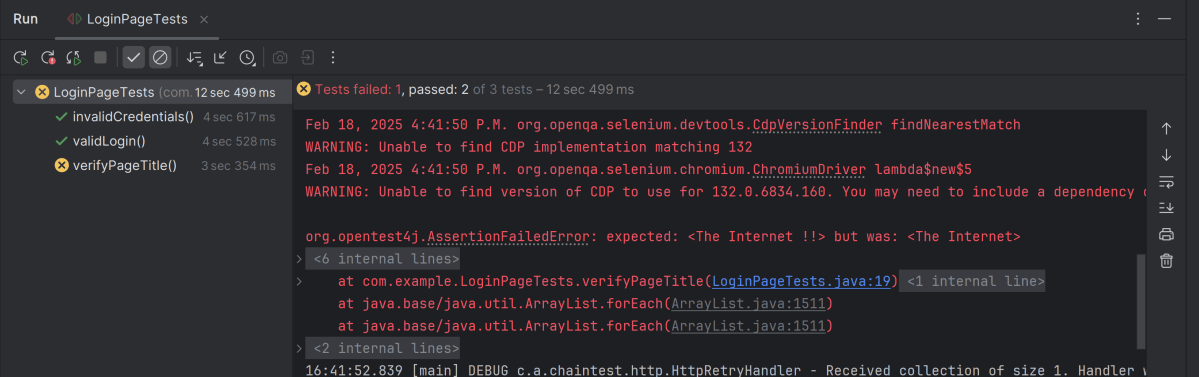
This report contains the high level summary of the test execution.

mvn clean test

How to test HTML5 validation messages with Selenium

HOME

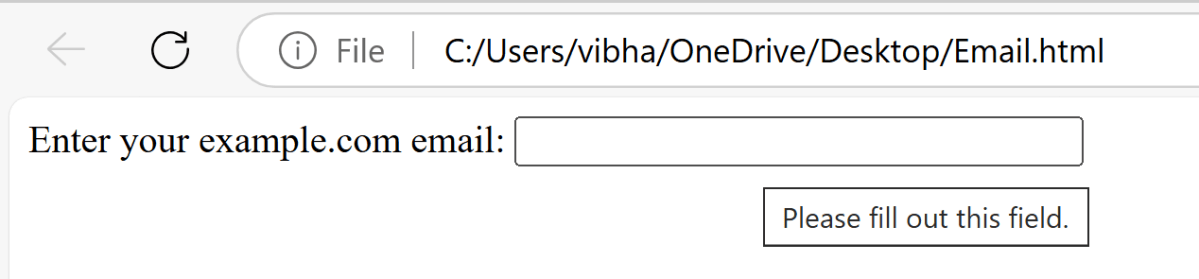
<label for="email">Enter your example.com email:</label>

<input type="email" id="email" pattern=".+@example\.com" size="30" required />

ChromeOptions options = new ChromeOptions();
WebDriver driver = new ChromeDriver(options);
driver.manage().timeouts().implicitlyWait(Duration.ofSeconds(5));
String filePath = "file:///C:/Users/vibha/OneDrive/Desktop/Email.html";
driver.get(filePath);

driver.manage().window().maximize();

WebElement email = driver.findElement(By.id("email"));
email.sendKeys("");
String validationMessage = email.getAttribute("validationMessage");
 String expectedMessage = "Please fill out this field.";
    if (validationMessage.equals(expectedMessage)) {
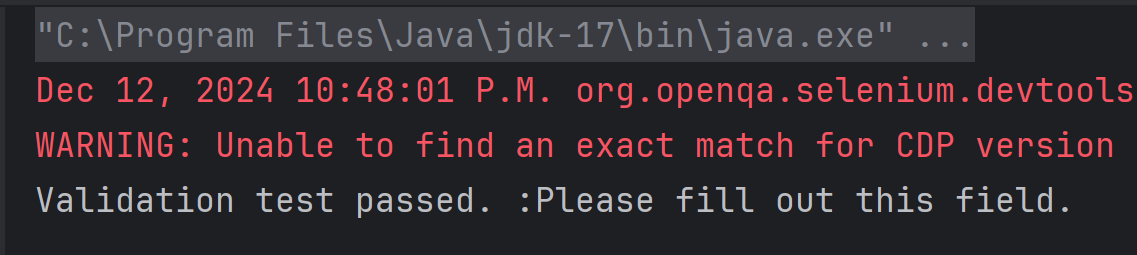
        System.out.println("Validation test passed. :" + validationMessage);
    } else {
        System.out.println("Validation test failed. Expected: '" + expectedMessage + "' but got: '" + validationMessage + "'");
    }

driver.quit();
package com.example.Sample;

import org.openqa.selenium.By;
import org.openqa.selenium.WebDriver;
import org.openqa.selenium.WebElement;
import org.openqa.selenium.chrome.ChromeDriver;
import org.openqa.selenium.chrome.ChromeOptions;
import org.openqa.selenium.support.ui.ExpectedConditions;
import org.openqa.selenium.support.ui.WebDriverWait;

import java.time.Duration;
import java.util.List;

public class HTML5Validation {

    public static void main(String[] args)  {

        // Setup the webdriver
        ChromeOptions options = new ChromeOptions();
        WebDriver driver = new ChromeDriver(options);

        // Put an Implicit wait and launch URL
        driver.manage().timeouts().implicitlyWait(Duration.ofSeconds(5));
        String filePath = "file:///C:/Users/vibha/OneDrive/Desktop/Email.html";
        driver.get(filePath);

        //maximize browser
        driver.manage().window().maximize();

        //Blank field
        WebElement email = driver.findElement(By.id("email"));
        email.sendKeys("");
        String validationMessage = email.getAttribute("validationMessage");

        // Expected validation message 
        String expectedMessage = "Please fill out this field.";
        if (validationMessage.equals(expectedMessage)) {
            System.out.println("Validation test passed. :" + validationMessage);
        } else {
            System.out.println("Validation test failed. Expected: '" + expectedMessage + "' but got: '" + validationMessage + "'");
        }

         // Close the browser
         driver.quit();
    }

}

Advance Selenium Multiple Choice Questions – MCQ1

HOME

Answer


Answer


Answer


Answer


Answer


Answer


Answer


Answer


Answer


a)  driver.waitForElement()

b)  new WebDriverWait().until(ExpectedConditions.elementToBeClickable())

c)  Thread.sleep()

d)  new WebDriverWait().until(ExpectedConditions.visibilityOfElementLocated())

Answer


a)  Actions.doubleClick(element)

b)  WebElement.contextClick()

c)  Actions.moveToElement(element).click()

d)  Actions.contextClick(element)

Answer


a)  driver.takeScreenshot()

b)  ((TakesScreenshot) driver).getScreenshotAs(OutputType.FILE)

c)  driver.getScreenshot()

d)  driver.captureScreen()

Answer


Answer


Answer


Answer


Answer


Answer


Answer


Answer


Answer


Answer


Answer


Answer


Answer

====================================================================

Advance Selenium Multiple Choice Answers – MCQ1

HOME


Selenium cannot handle security testing on its own. However, it can assist in certain aspects of security testing when integrated with specialized security tools.


How to decode JWT Token with Auth0 in Java

HOME

 {
    "typ":"JWT",
    "alg":"HS256"
 }
{
  "sub":"test",
  "roles":"ROLE_ADMIN",
  "iss":"myself",
  "exp":1471086381
}
HASHINGALGO( base64UrlEncode(header) + “.” + base64UrlEncode(payload),secret)
eyJhbGciOiJIUzI1NiJ9.eyJzdWIiOiJ0ZXN0Iiwicm9sZXMiOiJST0xFX0FETUlOIiwiaXNzIjoibXlzZWxmIiwiZXhwIjoxNDcxMDg2MzgxfQ.1EI2haSz9aMsHjFUXNVz2Z4mtC0nMdZo6bo3-x-aRpw
 <dependency>
      <groupId>com.auth0</groupId>
      <artifactId>java-jwt</artifactId>
      <version>4.4.0</version>
 </dependency>

DecodedJWT decodedJWT = JWT.decode(jwtToken);
String header = decodedJWT.getHeader();
String payload = decodedJWT.getPayload();
String signature = decodedJWT.getSignature();
String subject = decodedJWT.getSubject();
String issuer = decodedJWT.getIssuer();
String decodedHeader = new String(java.util.Base64.getUrlDecoder().decode(header));
String decodedPayload = new String(java.util.Base64.getUrlDecoder().decode(payload));
package com.example.JWT;
import com.auth0.jwt.JWT;
import com.auth0.jwt.interfaces.DecodedJWT;

public class JWTAuth0Decoder {

    public static void main(String[] args) {

        String jwtToken = "eyJhbGciOiJIUzI1NiJ9.eyJzdWIiOiJ0ZXN0Iiwicm9sZXMiOiJST0xFX0FETUlOIiwiaXNzIjoibXlzZWxmIiwiZXhwIjoxNDcxMDg2MzgxfQ.1EI2haSz9aMsHjFUXNVz2Z4mtC0nMdZo6bo3-x-aRpw";
        DecodedJWT decodedJWT = JWT.decode(jwtToken);

        // Retrieve header, payload, and signature
        String header = decodedJWT.getHeader();
        String payload = decodedJWT.getPayload();
        String signature = decodedJWT.getSignature();
        String subject = decodedJWT.getSubject();
        String issuer = decodedJWT.getIssuer();

        // Print each component
        System.out.println("Header (Base64): " + header);
        System.out.println("Payload (Base64): " + payload);
        System.out.println("Signature: " + signature);
        System.out.println("Subject: " + subject);
        System.out.println("Issuer: " + issuer);

        String decodedHeader = new String(java.util.Base64.getUrlDecoder().decode(header));
        String decodedPayload = new String(java.util.Base64.getUrlDecoder().decode(payload));

        System.out.println(" ****************** Decoded Values ******************* ");
        System.out.println("Decoded Header: " + decodedHeader);
        System.out.println("Decoded Payload: " + decodedPayload);

    }
}

Creating JWT with Auth0 in Java

HOME

 {
    "typ":"JWT",
    "alg":"HS256"
 }
{
  "iss": "QA_Automation",
  "sub": "QA_Automation Details",
  "userId": "9821",
  "roles": "ROLE_ADMIN",
  "scope": "read write",
  "iat": 1680000000,
  "exp": 1680000100,
  "jti": "uuid-guid",
  "nbf": 1680000001
}
HASHINGALGO( base64UrlEncode(header) + “.” + base64UrlEncode(payload),secret)
 <dependency>
      <groupId>com.auth0</groupId>
      <artifactId>java-jwt</artifactId>
      <version>4.4.0</version>
 </dependency>

Algorithm algorithm = Algorithm.HMAC256("qa-automation-expert-details");
.withIssuer("QA_Automation")
.withSubject("QA_Automation Details")
.withClaim("userId", "9821")
.withClaim("roles", "ROLE_ADMIN")
.withClaim("scope", "read write")
 .withIssuedAt(new Date())
 .withExpiresAt(new Date(System.currentTimeMillis() + 10000L))
.withJWTId(UUID.randomUUID().toString())
.withNotBefore(new Date(System.currentTimeMillis() + 100L))
.sign(algorithm);

import com.auth0.jwt.JWT;
import com.auth0.jwt.JWTVerifier;
import com.auth0.jwt.algorithms.Algorithm;
import com.auth0.jwt.exceptions.JWTVerificationException;
import com.auth0.jwt.interfaces.Claim;
import com.auth0.jwt.interfaces.DecodedJWT;
import java.util.Date;
import java.util.UUID;

public class JWTTokenGenerator {

    public static void main(String[] args) {

        Algorithm algorithm = Algorithm.HMAC256("qa-automation-expert-details");

        String jwtToken = JWT.create()
                .withIssuer("QA_Automation")
                .withSubject("QA_Automation Details")
                .withClaim("userId", "9821")
                .withClaim("roles", "ROLE_ADMIN")
                .withClaim("scope", "read write")
                .withIssuedAt(new Date())
                .withExpiresAt(new Date(System.currentTimeMillis() + 10000L))
                .withJWTId(UUID.randomUUID()
                        .toString())
                .withNotBefore(new Date(System.currentTimeMillis() + 100L))
                .sign(algorithm);

        System.out.println("jwtToken :" + jwtToken);
    }

}

Change Font Style in Excel with Apache POI

HOME

<!-- POI -->
    <dependency>
      <groupId>org.apache.poi</groupId>
      <artifactId>poi</artifactId>
      <version>5.3.0</version>
    </dependency>

    <!-- POI XML -->
    <dependency>
      <groupId>org.apache.poi</groupId>
      <artifactId>poi-ooxml</artifactId>
      <version>5.3.0</version>
    </dependency>
Font font = workbook.createFont();
XSSFWorkbook workbook = newXSSFWorkbook();
XSSFSheet sheet = workbook.createSheet("Example_Sheet");
 Row row = sheet.createRow(0);
Cell cell = row.createCell(0);
cell.setCellValue("Happy Days");
Font font = workbook.createFont();
font.setFontHeightInPoints((short) 24);
font.setFontName("Arial");
font.setBold(true);
font.setItalic(true);
font.setColor(IndexedColors.DARK_RED.getIndex());
font.setUnderline(Font.U_SINGLE);
CellStyle style = workbook.createCellStyle();
style.setFont(font);
cell.setCellStyle(style);
 try {
            FileOutputStream outputStream = new FileOutputStream("src/test/StyledCell.xlsx");
            workbook.write(outputStream);
            outputStream.close();
            System.out.println("StyledCell.xlsx Workbook is successfully created");
        } catch (IOException e) {
            e.printStackTrace();
        } finally {
            workbook.close();
        }

package com.example.Excel;

import org.apache.poi.ss.usermodel.*;
import org.apache.poi.xssf.usermodel.XSSFSheet;
import org.apache.poi.xssf.usermodel.XSSFWorkbook;

import java.io.FileOutputStream;
import java.io.IOException;

public class ApplyFont_Excel {

    public static void main(String[] args) throws IOException {

        // create blank workbook
        XSSFWorkbook workbook = new XSSFWorkbook();

        // Create a blank sheet
        XSSFSheet sheet = workbook.createSheet("Example_Sheet");

        //Create a row
        Row row = sheet.createRow(0);

        //Create a cell
        Cell cell = row.createCell(0);

        //Set the value of the cell
        cell.setCellValue("Happy Days");

        //Create a new font
        Font font = workbook.createFont();
        font.setFontHeightInPoints((short) 24);
        font.setFontName("Arial");
        font.setBold(true);
        font.setItalic(true);
        font.setColor(IndexedColors.DARK_RED.getIndex());
        font.setUnderline(Font.U_SINGLE);

        //Create a cell style and set the font
        CellStyle style = workbook.createCellStyle();
        style.setFont(font);

        //Apply the style to the cell
        cell.setCellStyle(style);

        //Write the output to the file
        try {
            FileOutputStream outputStream = new FileOutputStream("src/test/StyledCell.xlsx");
            workbook.write(outputStream);
            outputStream.close();
            System.out.println("StyledCell.xlsx Workbook is successfully created");
        } catch (IOException e) {
            e.printStackTrace();
        } finally {
            workbook.close();
        }

    }
}

package com.example.Excel;

import org.apache.poi.ss.usermodel.*;
import org.apache.poi.xssf.usermodel.XSSFSheet;
import org.apache.poi.xssf.usermodel.XSSFWorkbook;

import java.io.FileOutputStream;
import java.io.IOException;

public class ApplyFontMultipleRows_Excel {

    public static void main(String[] args) throws IOException {

        // create blank workbook
        XSSFWorkbook workbook = new XSSFWorkbook();

        // Create a blank sheet
        XSSFSheet sheet = workbook.createSheet("Example_Sheet");

        //Create a new font1
        Font font1 = workbook.createFont();
        font1.setFontHeightInPoints((short) 12);
        font1.setFontName("Arial");
        font1.setBold(true);
        font1.setItalic(true);
        font1.setColor(IndexedColors.DARK_RED.getIndex());
        font1.setUnderline(Font.U_SINGLE);

        //Create a new font2
        Font font2 = workbook.createFont();
        font2.setFontHeightInPoints((short) 14);
        font2.setFontName("Times New Roman");
        font2.setBold(true);
        font2.setItalic(true);
        font2.setColor(IndexedColors.BLUE.getIndex());

        //Create a new font3
        Font font3 = workbook.createFont();
        font3.setFontHeightInPoints((short) 16);
        font3.setFontName("Courier New");
        font3.setBold(true);
        font3.setColor(IndexedColors.GREEN.getIndex());

        //Create a cell style and set the font
        CellStyle style1 = workbook.createCellStyle();
        style1.setFont(font1);

        CellStyle style2 = workbook.createCellStyle();
        style2.setFont(font2);

        CellStyle style3 = workbook.createCellStyle();
        style3.setFont(font3);

        // Apply styles to rows
        Row row1 = sheet.createRow(0);
        Cell cell1 = row1.createCell(0);
        cell1.setCellValue("Underlined Italic Bold Arial");
        cell1.setCellStyle(style1);

        Row row2 = sheet.createRow(1);
        Cell cell2 = row2.createCell(0);
        cell2.setCellValue("Bold Italic Times New Roman");
        cell2.setCellStyle(style2);

        Row row3 = sheet.createRow(2);
        Cell cell3 = row3.createCell(0);
        cell3.setCellValue("Courier New");
        cell3.setCellStyle(style3);

        //Write the output to the file
        try {
            FileOutputStream outputStream = new FileOutputStream("src/test/FontStyle.xlsx");
            workbook.write(outputStream);
            outputStream.close();
            System.out.println("Workbook FontStyle.xlsx is created");
        } catch (IOException e) {
            e.printStackTrace();
        } finally {
            workbook.close();
        }

    }
}

How to test HTML ordered list in Selenium

HOME

<ol>
<html>

<head>
    <title>Numbered List Example</title>
</head>

<body>
    <h2>Ordered List with Numbers</h2>
    <ol>
        <li>JavaScript</li>
        <li>Python</li>
        <li>Java</li>
        <li>C++</li>
        <li>C#</li>
    </ol>
</body>

</html>

package com.example;

import org.openqa.selenium.Alert;
import org.openqa.selenium.By;
import org.openqa.selenium.WebDriver;
import org.openqa.selenium.WebElement;
import org.openqa.selenium.chrome.ChromeDriver;
import org.openqa.selenium.chrome.ChromeOptions;

import java.time.Duration;
import java.util.List;

public class OrderedList {

    public static void main(String[] args) {

        // Setup the webdriver
        ChromeOptions options = new ChromeOptions();
        WebDriver driver = new ChromeDriver(options);

        // Put an Implicit wait and launch URL
        driver.manage().timeouts().implicitlyWait(Duration.ofSeconds(5));

        //Start Browser
        String filePath = "file:///C:/Users/vibha/OneDrive/Desktop/OrderedList.html";
        driver.get(filePath);

        //maximize browser
        driver.manage().window().maximize();

        //Locate the ordered list using its tag name
        WebElement orderedList = driver.findElement(By.tagName(("ol")));

        //Fetch all the list items
        List<WebElement> listItems = orderedList.findElements(By.tagName("li"));

        //Iterate through the list and print the contents
        for (int i = 0; i < listItems.size(); i++) {
            System.out.println(listItems.get(i).getText());
        }

        //Close the main window
        driver.quit();
    }

}

// Setup the webdriver
ChromeOptions options = new ChromeOptions();
WebDriver driver = new ChromeDriver(options);
driver.manage().timeouts().implicitlyWait(Duration.ofSeconds(5));
String filePath = "file:///C:/Users/vibha/OneDrive/Desktop/OrderedList.html";
driver.get(filePath);
driver.manage().window().maximize();
 WebElement orderedList = driver.findElement(By.tagName(("ol")));
 List<WebElement> listItems = orderedList.findElements(By.tagName("li"));
for (int i = 0; i < listItems.size(); i++) {
            System.out.println(listItems.get(i).getText());
 }

driver.quit();

How to rerun failed tests twice in Cucumber

HOME

import io.cucumber.testng.AbstractTestNGCucumberTests;
import io.cucumber.testng.CucumberOptions;

@CucumberOptions(features = "src/test/resources/features/LoginPage.feature",
        glue = "com.example.definitions",
        plugin = {
                "pretty",
                "html:target/cucumber-reports/cucumber-report.html",
                "json:target/cucumber-reports/cucumber-report.json",
                "rerun:target/rerun.txt" // Saves paths of failed scenarios
        }
)
public class RunnerTests extends AbstractTestNGCucumberTests {
}

import io.cucumber.testng.AbstractTestNGCucumberTests;
import io.cucumber.testng.CucumberOptions;

@CucumberOptions(tags = "",
        features = "@target/rerun.txt",
        glue = "com.example.definitions",
        plugin =  {
                "pretty",
                "html:target/cucumber-reports/cucumber-rerun1-report.html",
                "json:target/cucumber-reports/cucumber-rerun1-report.json",
                "rerun:target/rerun1.txt"
        }
)

public class RunnerTestsFailed extends AbstractTestNGCucumberTests {
}

Create a third runner that reads from the rerun1.txt file and generates a separate JSON report for failed test reruns.

import io.cucumber.testng.AbstractTestNGCucumberTests;
import io.cucumber.testng.CucumberOptions;

@CucumberOptions(tags = "",
        features = "@target/rerun1.txt",
        glue = "com.example.definitions",
        plugin =  {
                "pretty",
                "html:target/cucumber-reports/cucumber-rerun2-report.html",
                "json:target/cucumber-reports/cucumber-rerun2-report.json"
        }
)

public class RunnerTestsSecondFailed extends AbstractTestNGCucumberTests {
}

<?xml version="1.0" encoding="UTF-8"?>
<!DOCTYPE suite SYSTEM "https://testng.org/testng-1.0.dtd">
<suite name="Suite">
    <test  name="Cucumber with TestNG Test">
        <classes>
            <class name="com.example.runner.RunnerTests"/>
            <class name="com.example.runner.RunnerTestsFailed"/>
            <class name="com.example.runner.RunnerTestsSecondFailed"/>
        </classes>
    </test> <!-- Test -->
</suite> <!-- Suite -->

<project xmlns="http://maven.apache.org/POM/4.0.0" xmlns:xsi="http://www.w3.org/2001/XMLSchema-instance"
  xsi:schemaLocation="http://maven.apache.org/POM/4.0.0 http://maven.apache.org/xsd/maven-4.0.0.xsd">
  <modelVersion>4.0.0</modelVersion>

  <groupId>com.example</groupId>
  <artifactId>POM_Cucumber_TestNG_Demo</artifactId>
  <version>1.0-SNAPSHOT</version>
  <packaging>jar</packaging>

  <name>POM_Cucumber_TestNG_Demo</name>
  <url>http://maven.apache.org</url>

  <properties>
    <project.build.sourceEncoding>UTF-8</project.build.sourceEncoding>
    <cucumber.version>7.18.1</cucumber.version>
    <selenium.version>4.25.0</selenium.version>
    <testng.version>7.10.2</testng.version>
    <apache.common.version>2.4</apache.common.version>
    <maven.compiler.plugin.version>3.13.0</maven.compiler.plugin.version>
    <maven.surefire.plugin.version>3.3.1</maven.surefire.plugin.version>
    <maven.compiler.source.version>17</maven.compiler.source.version>
    <maven.compiler.target.version>17</maven.compiler.target.version>
    <maven.cucumber.reporting.version>5.8.2</maven.cucumber.reporting.version>
  </properties>

  <dependencies>

    <dependency>
      <groupId>io.cucumber</groupId>
      <artifactId>cucumber-java</artifactId>
      <version>${cucumber.version}</version>
    </dependency>

    <dependency>
      <groupId>io.cucumber</groupId>
      <artifactId>cucumber-testng</artifactId>
      <version>${cucumber.version}</version>
      <scope>test</scope>
    </dependency>

    <!-- Selenium -->
    <dependency>
      <groupId>org.seleniumhq.selenium</groupId>
      <artifactId>selenium-java</artifactId>
      <version>${selenium.version}</version>
    </dependency>

    <!-- TestNG -->
    <dependency>
      <groupId>org.testng</groupId>
      <artifactId>testng</artifactId>
      <version>${testng.version}</version>
      <scope>test</scope>
    </dependency>

    <!-- Cucumber Reporting -->
    <dependency>
      <groupId>net.masterthought</groupId>
      <artifactId>cucumber-reporting</artifactId>
      <version>${maven.cucumber.reporting.version}</version>
    </dependency>

  </dependencies>

  <build>
    <plugins>
      <plugin>
        <groupId>org.apache.maven.plugins</groupId>
        <artifactId>maven-compiler-plugin</artifactId>
        <version>${maven.compiler.plugin.version}</version>
        <configuration>
          <source>${maven.compiler.source.version}</source>
          <target>${maven.compiler.target.version}</target>
        </configuration>
      </plugin>
      
        <plugin>
        <groupId>org.apache.maven.plugins</groupId>
        <artifactId>maven-surefire-plugin</artifactId>
        <version>${maven.surefire.plugin.version}</version>
        <configuration>
          <testFailureIgnore>true</testFailureIgnore>
          <suiteXmlFiles>
            <suiteXmlFile>testng.xml</suiteXmlFile>
          </suiteXmlFiles>
        </configuration>
      </plugin>

      <plugin>
        <groupId>net.masterthought</groupId>
        <artifactId>maven-cucumber-reporting</artifactId>
        <version>${maven.cucumber.reporting.version}</version>

        <executions>
          <execution>
            <id>generate-cucumber-report</id>
            <phase>verify</phase>
            <goals>
              <goal>generate</goal>
            </goals>
            <configuration>
              <projectName>Cucumber Reporting Example</projectName>
              <outputDirectory>target/cucumber-html-reports</outputDirectory>
              <inputDirectory>target</inputDirectory>
              <jsonFiles>
                <!-- Include both main and rerun JSON reports -->
                <param>target/cucumber-reports/cucumber-report.json</param>
                <param>target/cucumber-reports/cucumber-rerun-report.json</param>
                <param>**/*.json</param>
              </jsonFiles>
            </configuration>
          </execution>
        </executions>
      </plugin>

    </plugins>
  </build>
</project>

mvn clean verify