Last Updated On
Retrieving font properties using Selenium in Java is essential for testing and validating the styling of web applications. We can verify font-related CSS attributes such as font-family, font-size, and font-weight and so on. This ensures that your application’s user interface adheres to design specifications. It provides a consistent user experience across different browsers and environments.
To find the font properties of a web element in Selenium (Java), use the getCssValue method. We will use the getCssValue to extract properties of font like font-family, font-size, and many more.
In the below example, we want to find the font properties of the highlighted text, that is “LEARN MORE”.
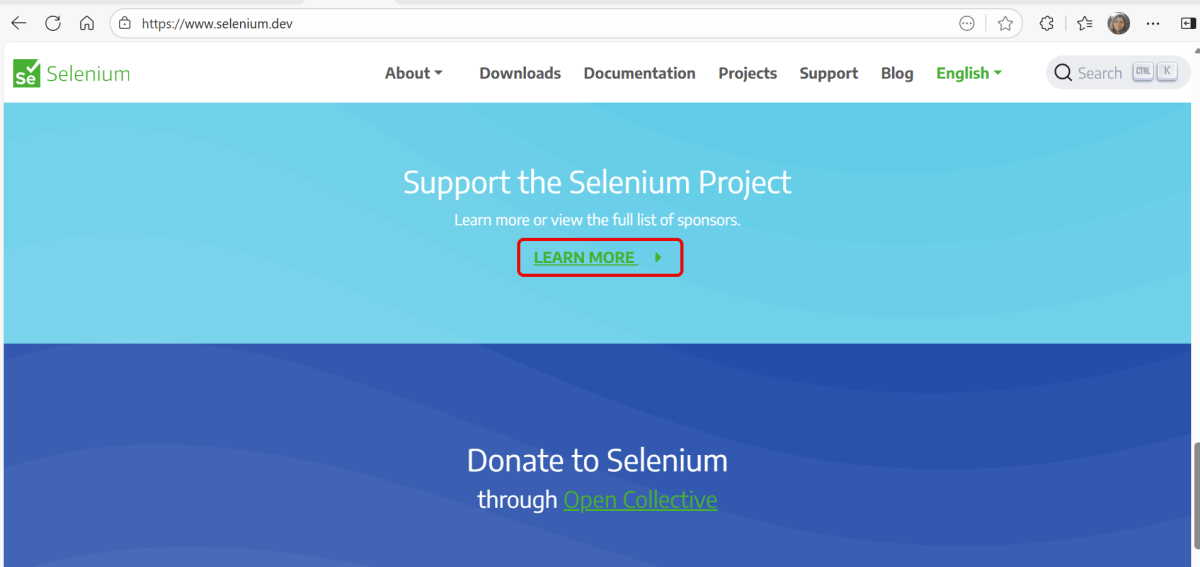
Below is the Selenium program that find the font properties of the highlighted text.
import org.openqa.selenium.By;
import org.openqa.selenium.WebDriver;
import org.openqa.selenium.WebElement;
import org.openqa.selenium.chrome.ChromeDriver;
import org.openqa.selenium.chrome.ChromeOptions;
import java.io.IOException;
import java.time.Duration;

public class Font_Example {

    public static void main(String args[]) throws IOException {

        ChromeOptions chromeOptions = new ChromeOptions();
        WebDriver driver = new ChromeDriver(chromeOptions);
        driver.manage().timeouts().implicitlyWait(Duration.ofSeconds(5));
        driver.manage().window().maximize();

        try {
            // Navigate to Url
            driver.get("https://www.selenium.dev/");

            WebElement element = driver.findElement(By.xpath("//*[@class='selenium-button-container']/a"));

            // Retrieve the font color
            String fontFamily  = element.getCssValue("font-family");
            System.out.println("fontFamily  : " + fontFamily );

            // Retrieve the font size
            String fontSize = element.getCssValue("font-size");
            System.out.println("fontSize : " + fontSize);

            // Retrieve the font weight
            String fontWeight = element.getCssValue("font-weight");
            System.out.println("fontWeight : " + fontWeight);

            // Retrieve the font style
            String fontStyle  = element.getCssValue("font-style");
            System.out.println("fontStyle : " + fontStyle);

            // Retrieve the font variation
            String fontVariant  = element.getCssValue("font-variant");
            System.out.println("fontVariant : " + fontVariant);

            // Retrieve the line height
            String lineHeight  = element.getCssValue("line-height");
            System.out.println("lineHeight : " + lineHeight);

            // Retrieve the letter spacing
            String letterSpacing  = element.getCssValue("letter-spacing");
            System.out.println("letterSpacing : " + letterSpacing);

            // Retrieve the text transform
            String textTransform  = element.getCssValue("text-transform");
            System.out.println("textTransform : " + textTransform);

            // Retrieve the text decoration
            String textDecoration  = element.getCssValue("text-decoration");
            System.out.println("textDecoration : " + textDecoration);

            System.out.println("####################### Verify the font properties #########################");

            // Verify the font family
            if (fontFamily.contains("Arial")) {
                System.out.println("fontFamily is as expected.");
            } else {
                System.out.println("fontFamily is not as expected. Found: " + fontFamily);
            }

            // Verify the font size
            if (fontSize.equals("16px")) {
                System.out.println("fontSize is as expected.");
            } else {
                System.out.println("fontSize is not as expected. Found: " + fontSize);
            }

            // Verify the font weight
            if (fontWeight.equals("500")) {
                System.out.println("fontWeight is as expected.");
            } else {
                System.out.println("fontWeight is not as expected. Found: " + fontWeight);
            }

            // Verify the font style
            if (fontStyle.equals("italic")) {
                System.out.println("fontStyle is as expected.");
            } else {
                System.out.println("fontStyle is not as expected. Found: " + fontStyle);
            }

            // Verify the font variant
            if (fontVariant.equals("small-caps")) {
                System.out.println("fontVariant is as expected.");
            } else {
                System.out.println("fontVariant is not as expected. Found: " + fontVariant);
            }

            // Verify the line height
            if (lineHeight.equals("24px")) {
                System.out.println("lineHeight is as expected.");
            } else {
                System.out.println("lineHeight is not as expected. Found: " + lineHeight);
            }

            // Verify the letter Spacing
            if (letterSpacing.equals("normal")) {
                System.out.println("letterSpacing is as expected.");
            } else {
                System.out.println("letterSpacing is not as expected. Found: " + letterSpacing);
            }

            // Verify the text Transform
            if (textTransform.equals("lowercase")) {
                System.out.println("textTransform is as expected.");
            } else {
                System.out.println("textTransform is not as expected. Found: " + textTransform);
            }

            // Verify the text Decoration
            if (textDecoration.equals("underline")) {
                System.out.println("textDecoration is as expected.");
            } else {
                System.out.println("textDecoration is not as expected. Found: " + textDecoration);
            }

        } finally {
            // Close the browser
            driver.quit();
        }
    }
}
The output of the above program is
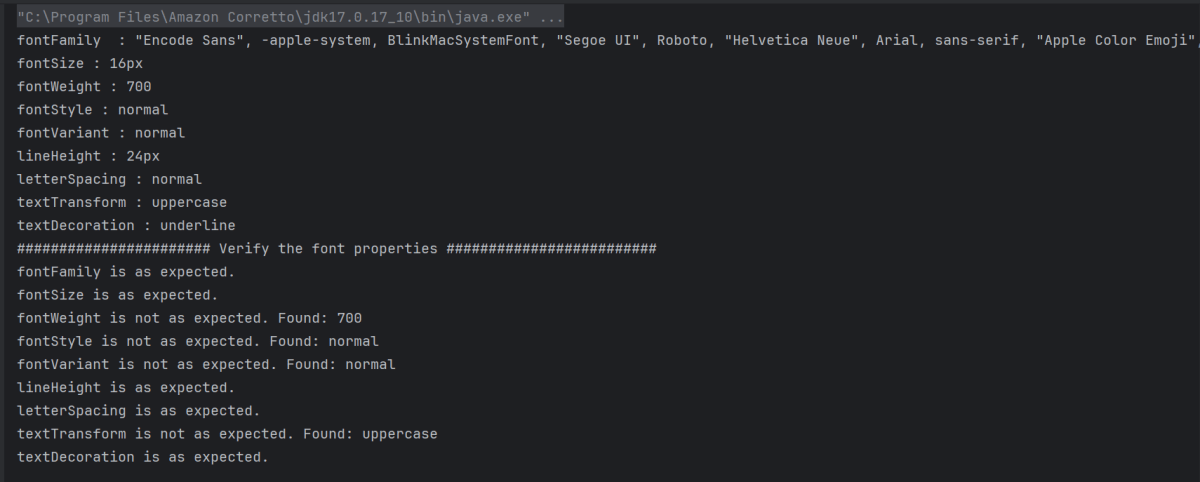
Explanation:
1. Set Up Chrome Options and WebDriver
ChromeOptions is created. A ChromeDriver object driver is created to control the Chrome browser. implicitlyWait is set to 5 seconds to wait for elements to be present before throwing an exception. The browser window is maximized for better visibility during the test.
ChromeOptions chromeOptions = new ChromeOptions();
WebDriver driver = new ChromeDriver(chromeOptions);
driver.manage().timeouts().implicitlyWait(Duration.ofSeconds(5));
driver.manage().window().maximize();
2. Navigate to the Webpage
The get() method of driver is used to navigate to the specified URL.
driver.get("https://www.selenium.dev/");
3. Find Element
An element is located using an XPath expression that targets an anchor tag within a specific container class.
WebElement element = driver.findElement(By.xpath("//*[@class='selenium-button-container']/a"));
4. Retrieve and Print CSS Font Properties
The script fetches various font-related CSS properties using getCssValue().
- font-family – Specifies the typeface to be applied to the text. (e.g. Arial, Helvetica, sans-serif)
- font-size – Determines the size of the font displayed in the element. (e.g. 16px)
- font-weight – Defines the weight (or thickness) of the font.(e.g. 100, 200, 400, 700)
- font-style – Applies styles such as italics to the text. (e.g. normal, italic, oblique)
- font-variant – Adjusts the appearance of text for typographic effects(e.g. small-caps, normal)
- line-height – Controls the vertical space between lines of text. (e.g. 24px)
- letter-spacing – Adjusts the space between individual letters. (e.g. normal)
- text-transform – Modifies the capitalization of text. (e.g. uppercase, lowercase, capitalize)
- text-decoration – Applies decorative lines to text. (e.g. underline, strikethrough)
// Retrieve the font color
String fontFamily  = element.getCssValue("font-family");
System.out.println("fontFamily  : " + fontFamily );

// Retrieve the font size
String fontSize = element.getCssValue("font-size");
System.out.println("fontSize : " + fontSize);

// Retrieve the font weight
String fontWeight = element.getCssValue("font-weight");
System.out.println("fontWeight : " + fontWeight);

// Retrieve the font style
String fontStyle  = element.getCssValue("font-style");
System.out.println("fontStyle : " + fontStyle);

// Retrieve the font variation
String fontVariant  = element.getCssValue("font-variant");
System.out.println("fontVariant : " + fontVariant);

// Retrieve the line height
String lineHeight  = element.getCssValue("line-height");
System.out.println("lineHeight : " + lineHeight);

// Retrieve the letter spacing
String letterSpacing  = element.getCssValue("letter-spacing");
System.out.println("letterSpacing : " + letterSpacing);

// Retrieve the text transform
String textTransform  = element.getCssValue("text-transform");
System.out.println("textTransform : " + textTransform);

// Retrieve the text decoration
String textDecoration  = element.getCssValue("text-decoration");
System.out.println("textDecoration : " + textDecoration);
5. Verification of CSS Properties
Each retrieved property is compared against expected values with individual checks. It prints corresponding messages based on whether the actual properties match the expected ones.
// Verify the font family
if (fontFamily.contains("Arial")) {
    System.out.println("fontFamily is as expected.");
} else {
    System.out.println("fontFamily is not as expected. Found: " + fontFamily);
}

// Verify the font size
if (fontSize.equals("16px")) {
    System.out.println("fontSize is as expected.");
} else {
    System.out.println("fontSize is not as expected. Found: " + fontSize);
}

// Verify the font weight
if (fontWeight.equals("500")) {
    System.out.println("fontWeight is as expected.");
} else {
    System.out.println("fontWeight is not as expected. Found: " + fontWeight);
}

// Verify the font style
if (fontStyle.equals("italic")) {
    System.out.println("fontStyle is as expected.");
} else {
    System.out.println("fontStyle is not as expected. Found: " + fontStyle);
}

// Verify the font variant
if (fontVariant.equals("small-caps")) {
    System.out.println("fontVariant is as expected.");
} else {
    System.out.println("fontVariant is not as expected. Found: " + fontVariant);
}

// Verify the line height
if (lineHeight.equals("24px")) {
    System.out.println("lineHeight is as expected.");
} else {
    System.out.println("lineHeight is not as expected. Found: " + lineHeight);
}

// Verify the letter Spacing
if (letterSpacing.equals("normal")) {
    System.out.println("letterSpacing is as expected.");
} else {
    System.out.println("letterSpacing is not as expected. Found: " + letterSpacing);
}

// Verify the text Transform
if (textTransform.equals("lowercase")) {
    System.out.println("textTransform is as expected.");
} else {
    System.out.println("textTransform is not as expected. Found: " + textTransform);
}

// Verify the text Decoration
if (textDecoration.equals("underline")) {
    System.out.println("textDecoration is as expected.");
} else {
    System.out.println("textDecoration is not as expected. Found: " + textDecoration);
}
6. Clean Up
The finally block ensures that the browser is closed irrespective of whether the test passes or fails, using driver.quit() to close all browser windows and end the session.
// Close the browser
driver.quit();
Summary:
1. Initialize a WebDriver and direct it to interact with your target webpage.
2. Identify the desired web element using suitable locators.
3. Retrieve and print out the CSS values for font attributes using getCssValue.
That’s it! Congratulations on making it through this tutorial and hope you found it useful! Happy Learning!!
 QA Automation Expert