In the previous tutorial, we have discussed about Implict and Explicit Wait. In this blob, we will discuss about Fluent Wait. Fluent Wait instance defines the maximum amount of time to wait for a condition, as well as the frequency with which to check the condition.
Users may configure the wait to ignore specific types of exceptions whilst waiting, such as NoSuchElementException when searching for an element on the page. Fluent Wait commands mainly used when the web elements, which sometimes visible in few seconds and sometimes take more, time than usual. Mainly in Ajax applications. We could set the default-pooling period based on the requirement.
Selenium 4
Wait<WebDriver> wait =
        new FluentWait<>(driver)
            .withTimeout(Duration.ofSeconds(2))
            .pollingEvery(Duration.ofMillis(300))
            .ignoring(ElementNotInteractableException.class);

    wait.until(
        d -> {
          revealed.sendKeys("Displayed");
          return true;
        });
Below is an example of fluent wait.
import org.openqa.selenium.By;
import org.openqa.selenium.ElementNotInteractableException;
import org.openqa.selenium.WebDriver;
import org.openqa.selenium.WebElement;
import org.openqa.selenium.chrome.ChromeDriver;
import org.openqa.selenium.support.ui.FluentWait;
import org.openqa.selenium.support.ui.Wait;

import java.time.Duration;

public class fluentwaitDemo {

    public static void main(String args[]) {

        WebDriver driver = new ChromeDriver();
        driver.manage().window().maximize();
        driver.manage().timeouts().implicitlyWait(Duration.ofSeconds(5));
        driver.get("https://www.selenium.dev/selenium/web/dynamic.html");
        driver.findElement(By.id("reveal")).click();

        WebElement revealTextBox = driver.findElement(By.id("revealed"));
        Wait<WebDriver> wait = new FluentWait<>(driver)
                        .withTimeout(Duration.ofSeconds(2))
                        .pollingEvery(Duration.ofMillis(300))
                        .ignoring(ElementNotInteractableException.class);

        wait.until(d -> {
                    revealTextBox.sendKeys("Selenium");
                    return true;
                });

        System.out.println("Input Text :" + revealTextBox.getDomProperty("value"));

        driver.quit();
    }
}
The output of the above program is

Selenium 3
Wait wait = new FluentWait(driver)

  .withTimeout(Duration.ofSeconds(30))
  .pollingEvery(Duration.ofSeconds(5))
  .ignoring(NoSuchElementException.class);

WebElement foo = wait.until(new Function() {
  public WebElement apply(WebDriver driver) {
    return driver.findElement(By.id("foo"));
  }
});
Below is an example which shows the use of Fluent Wait in real world
1) Launch new Browser and open https://www.rediff.com/
2) Click on Money Link present at the top center of the page
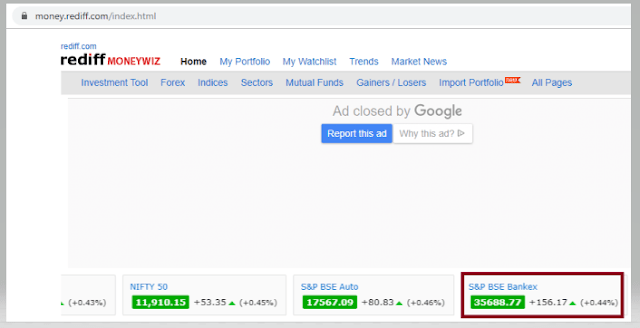
3) Sensex of different companies like S&P BSE Sensex, Nift 50, etc. appears at the center of the page
4) Don’t use Fluent Wait to find value of element S& BSE Sensex
5) Close the browser
package SeleniumTutorial;
import org.openqa.selenium.By;
import org.openqa.selenium.WebDriver;
import org.openqa.selenium.chrome.ChromeDriver;

public class FluentWaitDemo {
      public static void main(String[] args) {

System.setProperty("webdriver.chrome.driver","C:\\Users\\SingVi04\\Desktop\\Drivers\\chromedriver_win32\\chromedriver.exe");
           WebDriver driver= new ChromeDriver();
           driver.manage().window().maximize();
           driver.get("https://www.rediff.com/");
           driver.findElement(By.xpath("//a[@href ='https://money.rediff.com']")).click();

           String Message= driver.findElement(By.xpath("//*[@id='indmarquee']/div[1]/span[2]")).getText();
           System.out.println("Value of S&P BSE Bankex :"+Message);
      driver.quit();
     }
}

Output
Exception in thread "main" org.openqa.selenium.NoSuchElementException: no such element: Unable to locate element
{"method":"xpath","selector":"//*[@id='indmarquee']/div[1]/span[2]"}
(Session info: chrome=78.0.3904.108)
Here, we can see that NoSuchElementException found, as the Web Element is dynamic. We need to wait for some time to find the Web Element.
In the below example, will use Fluent Wait to overcome the above stated issue.
import java.time.Duration;
import org.openqa.selenium.By;
import org.openqa.selenium.NoSuchElementException;
import org.openqa.selenium.WebDriver;
import org.openqa.selenium.WebElement;
import org.openqa.selenium.chrome.ChromeDriver;
import org.openqa.selenium.support.ui.FluentWait;
import org.openqa.selenium.support.ui.Wait;

import com.google.common.base.Function;
    public classFluentWaitDemo {
          public static void main(String[] args) {

System.setProperty("webdriver.chrome.driver","C:\\Users\\SingVi04\\Desktop\\Drivers\\chromedriver_win32\\chromedriver.exe");
         WebDriver driver = newChromeDriver();
          driver.manage().window().maximize();
          driver.get("https://www.rediff.com/");

          driver.findElement(By.xpath("//a[@href ='https://money.rediff.com']")).click();

          //Fluent Wait
          Wait wait = new FluentWait(driver)
                     .withTimeout(Duration.ofSeconds(15))
                     .pollingEvery(Duration.ofSeconds(1))
                     .ignoring(NoSuchElementException.class);

                WebElement BSE_Sensex = wait.until(newFunction(){
                  public WebElement apply(WebDriver driver )
                  {
                      WebElement BSE_Bankex = driver.findElement(By.xpath("//*[@id='indmarquee']/div[1]/span[2]"));
           return BSE_Bankex;
                 }
          });

       String Message = BSE_Sensex.getText();
       System.out.println("Value of S&P BSE Bankex :"+Message);
      }
}

Output
Value of S&P BSE Bankex :42,597.43
Here,
Fluent Wait uses two parameters mainly – timeout value and polling frequency. In the above syntax we took time out value as 15 seconds and polling frequency as 2 seconds. The maximum amount of time (15 seconds) to wait for a condition and the frequency (2 seconds) to check the success or failure of a specified condition.
If the element is located with in this time frame it will perform the operations else it will throw an “ElementNotVisibleException”
Few important points:-
1) NoSuchElementException. class – This class should be imported from org.openqa.selenium. By default Selenium shows 2 packages as shown in the image below.

If NoSuchElementException.class imported from java.util package, then we will see NoSuchElementException as shown below.

Wait wait = new FluentWait(WebDriver reference)
.withTimeout(timeout, SECONDS)
.pollingEvery(timeout, SECONDS)
.ignoring(Exception.class);
This is deprecate. So, do not use this syntax. Refer the below image for error


That’s it! Congratulations on making it through this tutorial and hope you found it useful! Happy Learning!!


 QA Automation Expert