In this tutorial, we will discuss the Collections in the Postman.
Table of Contents
- What is Collection?
- How to create a Collection?
- How to create a request in Collection?
- How to delete a Collection?
What is Collection?
In Postman, a collection is a group of API requests that are saved in Postman and can be organized into folders. Within a collection, any number of folders can be formed. All API requests can be saved and stored in a collection, which can be shared around the team in the Postman workspace.
Organizing comparable requests into folders and collections enables the customer to better organize and document their demands.
For example, if you are testing or validating a restful API that has 10 different endpoints. Then, it makes sense to organize them in a collection that would make things like applying collection variables, import/export easier and could be run as part of a single collection.
How to create a Collection?
Step 1: Create a Collection, click on Collections, and then click on the “+” plus button.
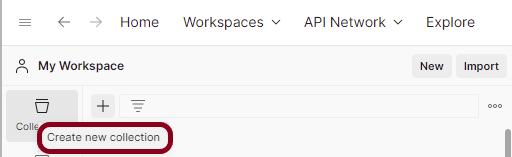
Step 2: Provide a name to the collection – “Demo”.

How to create a request in Collection?
Step 1: To add new requests to the collection, click on Collection and click Add requests (please note it’s also possible to create a request first and then add it to the collection as well as move in requests from one collection to another).

Below is the image of a new request in the collection.

How to delete a Collection?
Step 1: Select the more actions icon  next to the collection name.

Select the “Delete” button.

If a deleted collection is larger than 30 MB, you won’t be able to recover it. To avoid this, you can split the collection into smaller pieces before deleting it, or back up the collection first.
 QA Automation Expert