Rest–Assured is a Java-based library that is used to test RESTful Web Services.
Postman is an API platform for building and using APIs. It simplifies each step of the API lifecycle and streamlines collaboration, so you can create better APIs—faster.
The previous tutorial explain the Marshalling of Java Object to XML using JAXB Version 3.
There are tutorials about marshalling and unmarshalling XML using JAXB Version 2.
Marshalling – How to convert Java Objects to XML using JAXB
UnMarshalling- How to convert XML to Java Objects using JAXB
As of Java 11, JAXB is not part of the JRE anymore, and you need to configure the relevant libraries via your dependency management system, for example, either Maven or Gradle.
Configure the Java compiler level to be at least 11 and add the JAXB Version 3 dependencies to your pom file.
<!-- JAXB API v3.0.1 -->
<dependency>
    <groupId>jakarta.xml.bind</groupId>
    <artifactId>jakarta.xml.bind-api</artifactId>
    <version>3.0.1</version>
</dependency>

<!-- JAXB v3.0.2 reference implementation (curiously with com.sun coordinates) -->
<dependency>
    <groupId>com.sun.xml.bind</groupId>
    <artifactId>jaxb-impl</artifactId>
    <version>3.0.2</version>
    <scope>runtime</scope>
</dependency>
To know about the difference between JAXB Version 2 and JAXB Version3, refer this tutorial.
Sample XML Structure
<?xml version="1.0" encoding="UTF-8" standalone="yes"?>
<EmployeeDetail>
    <firstName>Terry</firstName>
    <lastName>Mathew</lastName>
    <age>30</age>
    <salary>75000.0</salary>
    <designation>Manager</designation>
    <contactNumber>+919999988822</contactNumber>
    <emailId>abc@test.com</emailId>
    <gender>female</gender>
    <maritalStatus>married</maritalStatus>
</EmployeeDetail>
Now, let us create the Java Objects (POJO) of above XML.
import jakarta.xml.bind.annotation.XmlAccessType;
import jakarta.xml.bind.annotation.XmlAccessorType;
import jakarta.xml.bind.annotation.XmlRootElement;

@XmlRootElement(name = "EmployeeDetail")
@XmlAccessorType(XmlAccessType.FIELD)
public class Employee {

	private String firstName;
	private String lastName;
	private int age;
	private double salary;
	private String designation;
	private String contactNumber;
	private String emailId;
	private String gender;
	private String maritalStatus;

	public Employee() {
		super();

	}

	// Getter and setter methods
	public String getFirstName() {
		return firstName;
	}

	public void setFirstName(String firstName) {
		this.firstName = firstName;
	}

	public String getLastName() {
		return lastName;
	}

	public void setLastName(String lastName) {
		this.lastName = lastName;
	}

	public int getAge() {
		return age;
	}

	public void setAge(int age) {
		this.age = age;
	}

	public double getSalary() {
		return salary;
	}

	public void setSalary(double salary) {
		this.salary = salary;
	}

	public String getDesignation() {
		return designation;
	}

	public void setDesignation(String designation) {
		this.designation = designation;
	}

	public String getContactNumber() {
		return contactNumber;
	}

	public void setContactNumber(String contactNumber) {
		this.contactNumber = contactNumber;
	}

	public String getEmailId() {
		return emailId;
	}

	public void setEmailId(String emailId) {
		this.emailId = emailId;
	}

	public String getGender() {
		return gender;
	}

	public void setGender(String gender) {
		this.gender = gender;
	}

	public String getMaritalStatus() {
		return maritalStatus;
	}

	public void setMaritalStatus(String maritalStatus) {
		this.maritalStatus = maritalStatus;
	}

    @Override
	public String toString() {
		return "Employee [FirstName=" + firstName + ", LastName=" + lastName + ", Age=" + age + ", Salary=" + salary
				+ ", Designation=" + designation + ", ContactNumber=" + contactNumber + ", EmailId=" + emailId
				+ ", Gender=" + gender + ", MaritalStatus=" + maritalStatus + "]";
	}
}
Let’s create a simple program using the JAXBContext which provides an abstraction for managing the XML/Java binding information necessary to implement the JAXB binding framework operations and unmarshal.
import java.io.File;

import org.junit.Test;

import jakarta.xml.bind.JAXBContext;
import jakarta.xml.bind.JAXBException;
import jakarta.xml.bind.Unmarshaller;

public class JAXBDeserialization {

	@Test
	public void JAXBUnmarshalTest() {

		try {

			String userDir = System.getProperty("user.dir");
			File file = new File(userDir + "\\src\\test\\resources\\JAXB_XML.xml");

			JAXBContext jaxbContext = JAXBContext.newInstance(Employee.class);

			Unmarshaller jaxbUnmarshaller = jaxbContext.createUnmarshaller();
			Employee employee = (Employee) jaxbUnmarshaller.unmarshal(file);
			System.out.println(employee);

		} catch (JAXBException e) {
			e.printStackTrace();
		}

	}
When we run the code above, we may check the console output to verify that we have successfully converted XML data into a Java object:

This response is the result of the toString() method in POJO Class.
There is another way to get the values of each node of XML.
   @Test
	public void JAXBUnmarshalTest1() {

		try {

			String userDir = System.getProperty("user.dir");
			File file = new File(userDir + "\\src\\test\\resources\\JAXB_XML.xml");

			JAXBContext jaxbContext = JAXBContext.newInstance(Employee.class);

			Unmarshaller jaxbUnmarshaller = jaxbContext.createUnmarshaller();
			Employee employee = (Employee) jaxbUnmarshaller.unmarshal(file);

			System.out.println("FirstName: " + employee.getFirstName());
			System.out.println("LastName: " + employee.getLastName());
			System.out.println("Age: " + employee.getAge());
			System.out.println("Salary: " + employee.getSalary());
			System.out.println("Contact Number: " + employee.getContactNumber());
			System.out.println("Designation: " + employee.getDesignation());
			System.out.println("Gender: " + employee.getGender());
			System.out.println("EmailId: " + employee.getEmailId());
			System.out.println("MaritalStatus: " + employee.getMaritalStatus());

		} catch (JAXBException e) {
			e.printStackTrace();
		}

	}
When we run the code above, we may check the console output to verify that we have successfully converted XML data into a Java object:

The Unmarshaller class governs the process of deserializing XML data into newly created Java content trees, optionally validating the XML data as it is unmarshalled. It provides overloading of unmarshal methods for many input kinds.
We are done! Congratulations on making it through this tutorial and hope you found it useful! Happy Learning!!
The previous tutorials have explained marshalling and unmarshalling of XML using JAXB Version 2.
As of Java 11, JAXB is not part of the JRE anymore, and you need to configure the relevant libraries via your dependency management system, for example, either Maven or Gradle.
Configure the Java compiler level to be at least 11 and add the JAXB Version 3 dependencies to your pom file.
<!-- JAXB API v3.0.1 -->
<dependency>
    <groupId>jakarta.xml.bind</groupId>
    <artifactId>jakarta.xml.bind-api</artifactId>
    <version>3.0.1</version>
</dependency>

<!-- JAXB v3.0.2 reference implementation (curiously with com.sun coordinates) -->
<dependency>
    <groupId>com.sun.xml.bind</groupId>
    <artifactId>jaxb-impl</artifactId>
    <version>3.0.2</version>
    <scope>runtime</scope>
</dependency>
Eclipse foundation rebrand the Java EE javax.xml.* to Jakarta EE jakarta.xml.*.
Below are some JAXB APIs in versions 2 and 3.
//@Since 3.0.0, rebrand to Jakarta.xml

import jakarta.xml.bind.annotation.XmlAccessType;
import jakarta.xml.bind.annotation.XmlAccessorType;
import jakarta.xml.bind.annotation.XmlRootElement;
import jakarta.xml.bind.annotation.XmlElement;
import jakarta.xml.bind.annotation.XmlTransient;
import jakarta.xml.bind.annotation.XmlType;

import jakarta.xml.bind.JAXBContext;
import jakarta.xml.bind.JAXBException;
import jakarta.xml.bind.Marshaller;
import jakarta.xml.bind.PropertyException;
import jakarta.xml.bind.Unmarshaller;

//JAXB Version 2.0

import javax.xml.bind.annotation.XmlAccessType;
import javax.xml.bind.annotation.XmlAccessorType;
import javax.xml.bind.annotation.XmlElement;
import javax.xml.bind.annotation.XmlRootElement;
import javax.xml.bind.annotation.XmlTransient;
import javax.xml.bind.annotation.XmlType;

import javax.xml.bind.JAXBContext;
import javax.xml.bind.JAXBException;
import javax.xml.bind.Marshaller;
import javax.xml.bind.PropertyException;
import javax.xml.bind.Unmarshaller;
<?xml version="1.0" encoding="UTF-8" standalone="yes"?>
<EmployeeDetail>
    <firstName>Terry</firstName>
    <lastName>Mathew</lastName>
    <age>30</age>
    <salary>75000.0</salary>
    <designation>Manager</designation>
    <contactNumber>+919999988822</contactNumber>
    <emailId>abc@test.com</emailId>
    <gender>female</gender>
    <maritalStatus>married</maritalStatus>
</EmployeeDetail>
Now, let us create the Java Objects (POJO) of the above XML.
import jakarta.xml.bind.annotation.XmlAccessType;
import jakarta.xml.bind.annotation.XmlAccessorType;
import jakarta.xml.bind.annotation.XmlRootElement;

@XmlRootElement(name = "EmployeeDetail")
@XmlAccessorType(XmlAccessType.FIELD)
public class Employee {

	private String firstName;
	private String lastName;
	private int age;
	private double salary;
	private String designation;
	private String contactNumber;
	private String emailId;
	private String gender;
	private String maritalStatus;

	public Employee() {
		super();

	}

	// Getter and setter methods
	public String getFirstName() {
		return firstName;
	}

	public void setFirstName(String firstName) {
		this.firstName = firstName;
	}

	public String getLastName() {
		return lastName;
	}

	public void setLastName(String lastName) {
		this.lastName = lastName;
	}

	public int getAge() {
		return age;
	}

	public void setAge(int age) {
		this.age = age;
	}

	public double getSalary() {
		return salary;
	}

	public void setSalary(double salary) {
		this.salary = salary;
	}

	public String getDesignation() {
		return designation;
	}

	public void setDesignation(String designation) {
		this.designation = designation;
	}

	public String getContactNumber() {
		return contactNumber;
	}

	public void setContactNumber(String contactNumber) {
		this.contactNumber = contactNumber;
	}

	public String getEmailId() {
		return emailId;
	}

	public void setEmailId(String emailId) {
		this.emailId = emailId;
	}

	public String getGender() {
		return gender;
	}

	public void setGender(String gender) {
		this.gender = gender;
	}

	public String getMaritalStatus() {
		return maritalStatus;
	}

	public void setMaritalStatus(String maritalStatus) {
		this.maritalStatus = maritalStatus;
	}

    @Override
	public String toString() {
		return "Employee [FirstName=" + firstName + ", LastName=" + lastName + ", Age=" + age + ", Salary=" + salary
				+ ", Designation=" + designation + ", ContactNumber=" + contactNumber + ", EmailId=" + emailId
				+ ", Gender=" + gender + ", MaritalStatus=" + maritalStatus + "]";
	}
}
Let’s create a simple program using the JAXBContext which provides an abstraction for managing the XML/Java binding information necessary to implement the JAXB binding framework operations.
import java.io.StringWriter;

import org.junit.Test;

import jakarta.xml.bind.JAXBContext;
import jakarta.xml.bind.JAXBException;
import jakarta.xml.bind.Marshaller;
import jakarta.xml.bind.PropertyException;

public class JAXBSerialization {

	@Test
	public void serializationTest1() {

		try {

			Employee employee = new Employee();

			employee.setFirstName("Terry");
			employee.setLastName("Mathew");
			employee.setAge(30);
			employee.setSalary(75000);
			employee.setDesignation("Manager");
			employee.setContactNumber("+919999988822");
			employee.setEmailId("abc@test.com");
			employee.setMaritalStatus("married");
			employee.setGender("female");

			// Create JAXB Context
			JAXBContext context = JAXBContext.newInstance(Employee.class);

			// Create Marshaller
			Marshaller jaxbMarshaller = context.createMarshaller();

			// Required formatting
			jaxbMarshaller.setProperty(Marshaller.JAXB_FORMATTED_OUTPUT, Boolean.TRUE);

			// Print XML String to Console
			StringWriter sw = new StringWriter();

			// Write XML to StringWriter
			jaxbMarshaller.marshal(employee, sw);

			// Verify XML Content
			String xmlContent = sw.toString();
			System.out.println(xmlContent);

		} catch (PropertyException e) {
			e.printStackTrace();

		} catch (JAXBException e) {

		}
	}

}
When we run the code above, we may check the console output to verify that we have successfully converted the Java object into XML:

The Marshaller class is responsible for governing the process of serializing Java content trees back into XML data.
I hope this has helped you to understand the use of JAXB Version 3.
We are done! Congratulations on making it through this tutorial and hope you found it useful! Happy Learning!!
In this tutorial, I will explain the testing of a JSON Payload using GSON API.
Refer to the below tutorials to understand how GSON works:-
Serialization – How to convert Java Object To JSON Object Using Gson API
Deserialization – How to create JSON Object to JAVA Object Using Gson API
Add below dependency to POM.xml to use Gson API.
<dependency>
    <groupId>com.google.code.gson</groupId>
    <artifactId>gson</artifactId>
    <version>2.8.9</version>
</dependency>
As we know, we can use toJson() to convert the JAVA objects to JSON Payload.
In the below example, I have created a POJO class with the name of EmployeeDetails. This class contains the data members corresponding to the JSON nodes and their corresponding getter and setter methods.
public class EmployeeDetails {

	// private variables or data members of pojo class
	private String name;
	private double salary;
	private int age;

	public String getName() {
		return name;
	}

	public void setName(String name) {
		this.name = name;
	}

	public double getSalary() {
		return salary;
	}

	public void setSalary(double salary) {
		this.salary = salary;
	}

	public int getAge() {
		return age;
	}

	public void setAge(int age) {
		this.age = age;
	}

}
Below, will create a JSON payload and pass it as a request body to the Rest API.
	@Test
	public void createEmployee() throws IOException {

		// Just create an object of Pojo class
		EmployeeDetails emp = new EmployeeDetails();
		emp.setName("GsonTest");
		emp.setSalary(50000);
		emp.setAge(25);

		// Converting a Java class object to a JSON payload as string using Gson
		Gson builder = new GsonBuilder().setPrettyPrinting().create();
		String employeePrettyJsonPayload = builder.toJson(emp);
		System.out.println("Request");
		System.out.println(employeePrettyJsonPayload);
		System.out.println("=========================================");
		System.out.println("Response");

		// GIVEN
		given()
              .baseUri("http://dummy.restapiexample.com/api")
              .contentType(ContentType.JSON).body(emp)

		// WHEN
		.when()
               .post("/v1/create")

		// THEN
		.then()
              .assertThat().statusCode(200)
              .body("status", equalTo("success"))
			  .body("data.name", equalTo("GsonTest"))
              .body("data.salary", equalTo(50000))
			  .body("data.age", equalTo(25))
              .body("message", equalTo("Successfully! Record has been added."))
              .log().body();

	}
}
Output

We are done! Congratulations on making it through this tutorial and hope you found it useful! Happy Learning!!
This tutorial shows how to convert JSON to JAVA map using Jackson’s data binding. In the previous tutorials, I have explained converting Java Objects/Arrays to JSON String using Jackson API. You can refer below tutorials.
Serialization – How to create JSON Payload from Java Object – Jackson API
Deserialization – How to convert JSON to Java Object using Jackson API
How to create JSON Array Payload using POJO – Jackson API
How to create Nested JSON Object using POJO – Jackson API
To start with, we need to add Jackson Maven Dependency to the POM. Always add the latest version of Jackson dependency to your project.
<dependency>
    <groupId>com.fasterxml.jackson.core</groupId>
    <artifactId>jackson-databind</artifactId>
    <version>2.13.0</version>
</dependency
Deserialization converts a stream of bytes into a Java object that we can use in code.
We use Jackson’s ObjectMapper, as we did for serialization, using readValue() to process the input. Also, note our use of Jackson’s TypeReference, which we’ll use in all of our deserialization examples to describe the type of our destination Map.
   @Test
	public void DeserializationMapTest() throws JsonProcessingException {

		String employeeString =
                     "{\r\n"
                    + "  \"firstName\" : \"Deserialization\",\r\n"
				    + "  \"lastName\" : \"Test\",\r\n"
                    + "  \"age\" : 25,\r\n"
                    + "  \"salary\" : 50000.0,\r\n"
				    + "  \"designation\" : \"Manager\",\r\n"
                    + "  \"contactNumber\" : \"+918882211111\",\r\n"
				    + "  \"emailId\" : \"abc@test.com\",\r\n"
                    + "  \"gender\" : \"female\",\r\n"
				    + "  \"maritalStatus\" : \"single\"\r\n"
                    + " }";

		Map<String, String> resultMap = new HashMap<String, String>();
		ObjectMapper mapper = new ObjectMapper();

		// Converting a JSON to Java Map
		try {
			resultMap = mapper.readValue(employeeString, new TypeReference<HashMap<String, String>>() {
			});
		} catch (JsonMappingException e) {
			e.printStackTrace();
		} catch (JsonProcessingException e) {
			e.printStackTrace();
		}

		System.out.println("Output Map :" + resultMap);
	}
Output

We can get the JSON from a file and convert it to a Hash Map too. Below is an example of the same.

   @Test
	public void PayloadFromFile() {

		String userDir = System.getProperty("user.dir");
		ObjectMapper mapper = new ObjectMapper();

		// Converting Employee JSON string to Employee class object
		Map<String, Object> empMap;
		try {
			empMap = mapper.readValue(new File(userDir + "\\src\\test\\resources\\JSONFromMap.json"),
					new TypeReference<Map<String, Object>>() {
					});

			System.out.println("Gender : " + empMap.get("gender"));
			System.out.println("DOB : " + empMap.get("DOB"));
			System.out.println("Name : " + empMap.get("name"));
			System.out.println("ContactNumber : " + empMap.get("contactNumber"));
			System.out.println("SkillSet : " + empMap.get("skillset"));
		} catch (StreamReadException e) {
			e.printStackTrace();
		} catch (DatabindException e) {
			e.printStackTrace();
		} catch (IOException e) {
			e.printStackTrace();
		}

	}
Output

We are done! Congratulations on making it through this tutorial and hope you found it useful! Happy Learning!!
The previous tutorial explains the Serializarion process that means converting Java Objects to JSON Payload. This is done using Jackson API. This tutorial explains the Deserialization, means converting JSON Payload to Java Objects.
Deserialization – It is the reverse of serializing. In this process, we will read the Serialized byte stream from the file and convert it back into the Class instance representation. Here, we are converting a JSON Object to an Employee class object.
We are using Jackson API for Serialization and Deserialization. So, add the Jackson dependency to the project.
<dependency>
    <groupId>com.fasterxml.jackson.core</groupId>
    <artifactId>jackson-databind</artifactId>
    <version>2.13.0</version>
</dependency>
Below is the sample code of the Employee table, which contains the data members needed for Employee JSON and their corresponding getter and setter methods.
public class Employee {

    // private variables or data members of POJO class
    private String firstName;
    private String lastName;
    private int age;
    private double salary;
    private String designation;
    private String contactNumber;
    private String emailId;

    // Getter and setter methods
    public String getFirstName() {
        return firstName;
    }

    public void setFirstName(String firstName) {
        this.firstName = firstName;
    }

    public String getLastName() {
        return lastName;
    }

    public void setLastName(String lastName) {
        this.lastName = lastName;
    }

    public int getAge() {
        return age;
    }

    public void setAge(int age) {
        this.age = age;
    }

    public double getSalary() {
        return salary;
    }

    public void setSalary(double salary) {
        this.salary = salary;
    }

    public String getDesignation() {
        return designation;
    }

    public void setDesignation(String designation) {
        this.designation = designation;
    }

    public String getContactNumber() {
        return contactNumber;
    }

    public void setContactNumber(String contactNumber) {
        this.contactNumber = contactNumber;
    }

    public String getEmailId() {
        return emailId;
    }

    public void setEmailId(String emailId) {
        this.emailId = emailId;
    }

}
Now, let us create a Test Class to show Deserialization.
    @Test
    public void deserializationTest() {

        Employee employee = new Employee();
        employee.setFirstName("Tim");
        employee.setLastName("Tran");
        employee.setAge(49);
        employee.setSalary(89000);
        employee.setDesignation("Manager");
        employee.setContactNumber("+3538944412341");
        employee.setEmailId("ttran@test.com");

        // Converting a Java class object to a JSON payload as string
        ObjectMapper mapper = new ObjectMapper();
        String employeeJson = null;
        try {
            employeeJson = mapper.writeValueAsString(employee);
        } catch (JsonProcessingException e) {
            e.printStackTrace();
        }

        // Converting Employee json string to Employee class object

        try {
            Employee employee2 = mapper.readValue(employeeJson, Employee.class);
            System.out.println("First Name of employee : " + employee2.getFirstName());
            System.out.println("Last Name of employee : " + employee2.getLastName());
            System.out.println("Age of employee : " + employee2.getAge());
            System.out.println("Salary of employee : " + employee2.getSalary());
            System.out.println("Designation of employee : " + employee2.getDesignation());
            System.out.println("Contact Number of employee : " + employee2.getContactNumber());
            System.out.println("EmailId of employee : " + employee2.getEmailId());
        } catch (JsonMappingException e) {
            e.printStackTrace();
        } catch (JsonProcessingException e) {
            e.printStackTrace();
        }

    }

We can read JSON String and convert it back to Java Object as shown below. We will use readValue() to deserialize JSON content from the given file into a given Java type.
This is my JSON saved in a file placed at Desktop.

Below is the Test
@Test
public void readJson() {

    ObjectMapper mapper = new ObjectMapper();

    // Converting Employee JSON string to Employee class object
    try {
          Employee employee2 = mapper.readValue(new File(
                "C:\\Users\\Vibha\\Desktop\\Employee.json"),
                Employee.class);
          System.out.println("First Name of employee : " + employee2.getFirstName());
          System.out.println("Last Name of employee : " + employee2.getLastName());
          System.out.println("Age of employee : " + employee2.getAge());
          System.out.println("Salary of employee : " + employee2.getSalary());
          System.out.println("Designation of employee : " + employee2.getDesignation());
          System.out.println("Contact Number of employee : " + employee2.getContactNumber());
          System.out.println("EmailId of employee : " + employee2.getEmailId());
    } catch (StreamReadException e) {
        e.printStackTrace();
    } catch (DatabindException e) {
        e.printStackTrace();
    } catch (IOException e) {
        e.printStackTrace();
    }
}
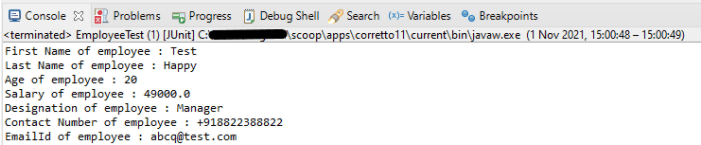
I hope this has helped to clear your doubts regarding how to create Java Objects from JSON using Jackson API.
We are done! Congratulations on making it through this tutorial and hope you found it useful! Happy Learning!!
This tutorial shows how to convert a Java map to JSON string using Jackson’s data binding. In the previous tutorials, I explained converting Java Objects/Arrays to JSON String using Jackson API. You can refer to the below tutorials.
Serialization – How to create JSON Payload from Java Object – Jackson API
How to create JSON Array Payload using POJO – Jackson API
How to create Nested JSON Object using POJO – Jackson API
To start off, add the latest Jackson dataformat Maven dependency to the project.
<dependency>
    <groupId>com.fasterxml.jackson.dataformat</groupId>
    <artifactId>jackson-dataformat-xml</artifactId>
    <version>2.13.0</version>
</dependency>
Sample JSON
{
  "skillset" : [
                 "Java",
                 "Teradata",
                 "Python",
                 "Power BI"
               ],
  "gender" : "female",
  "DOB" : "12-02-1985",
  "name" : "Vibha Singh",
  "contactNumber" : "+919999988822",
  "employeeId" : "10342256",
  "location" : "Dublin",
  "emailId" : "abc@test.com",
  "salary" : "75000.0"
}
First, we will populate a Map, then convert them into JSON and later write that JSON to a file.
	@Test
	public void SerializationMapTest() {

		ObjectMapper mapper = new ObjectMapper();
		Map<String, Object> inputMap = new HashMap<String, Object>();

		inputMap.put("employeeId", "10342256");
		inputMap.put("name", "Vibha Singh");
		inputMap.put("DOB", "12-02-1985");
		inputMap.put("salary", "75000.0");
		inputMap.put("location", "Dublin");
		inputMap.put("contactNumber", "+919999988822");
		inputMap.put("emailId", "abc@test.com");
		inputMap.put("gender", "female");

		List<String> skillset = new ArrayList<String>();

		skillset.add("Java");
		skillset.add("Teradata");
		skillset.add("Python");
		skillset.add("Power BI");

		inputMap.put("skillset", skillset);

		// Converting map to a JSON payload as string
		try {
			String employeePrettyJson = mapper.writerWithDefaultPrettyPrinter().writeValueAsString(inputMap);
			System.out.println(employeePrettyJson);
		} catch (JsonProcessingException e) {
			e.printStackTrace();
		}

		String userDir = System.getProperty("user.dir");

        //Writing JSON on a file
		try {
			mapper.writerWithDefaultPrettyPrinter()
					.writeValue(new File(userDir + "\\src\\test\\resources\\JSONFromMap.json"), inputMap);
		} catch (IOException e) {
			e.printStackTrace();
		}

	}
}
Output

As mentioned above, the new JSON is saved in a file and placed under src/test/resources.

Below is the file with JSON.

Congratulations, we are done. We have successfully created a JSON using HashMap.
This tutorial will show how to ignore certain fields when serializing an object to JSON or deserializing the JSON to object using Jackson 2.x.
This is very useful when the Jackson defaults aren’t enough and we need to control exactly what gets serialized to JSON – and there are several ways to ignore properties. One of the most common way is the use of @JsonIgnore Annotation, but it has some limitations. One of the major limitation is that if it is applied to getter method only, it will ignore setter method too. So, we cannot control if we want a property to be ignored for either Serialization or Deserialization.
Moreover, when there is a requirement to ignore multiple properties, it is tedious to mention @JsonIgnore to all the properties which need to be ignored. Imagine there are 100 properties and we need to ignore 30 properties, it is tedious to mention @JsonIgnore to each properties.
To start of, add Jackson databind dependency to the project. Always add the latest dependency to your project.
<dependency>
    <groupId>com.fasterxml.jackson.core</groupId>
    <artifactId>jackson-databind</artifactId>
    <version>2.13.0</version>
</dependency>
We can ignore specific fields at the class level, using the @JsonIgnoreProperties annotation and specifying the fields by name.
Syntax
@JsonIgnoreProperties({"emailId","gender","maritalStatus"})
Sample JSON Payload
{
  "firstName" : "Vibha",
  "lastName" : "Singh",
  "age" : 30,
  "salary" : 75000.0,
  "designation" : "Manager",
  "contactNumber" : "+919999988822",
  "emailId" : "abc@test.com",
  "gender" : "female",
  "maritalStatus" : "married"
 }
We need to create POJO for above JSON. So, let us create a class called Employee. Then create the private data members corresponding to the the nodes of the JSON and the getter and setter methods of these data members.
POJO Class
@JsonIgnoreProperties({"emailId","gender","maritalStatus"})
public class Employee {

	// private variables or data members of pojo class
	private String firstName;
	private String lastName;
	private int age;
	private double salary;
	private String designation;
	private String contactNumber;
	private String emailId;
	private String gender;
	private String maritalStatus;

	// Getter and setter methods
	public String getFirstName() {
		return firstName;
	}

	public void setFirstName(String firstName) {
		this.firstName = firstName;
	}

	public String getLastName() {
		return lastName;
	}

	public void setLastName(String lastName) {
		this.lastName = lastName;
	}

	public int getAge() {
		return age;
	}

	public void setAge(int age) {
		this.age = age;
	}

	public double getSalary() {
		return salary;
	}

	public void setSalary(double salary) {
		this.salary = salary;
	}

	public String getDesignation() {
		return designation;
	}

	public void setDesignation(String designation) {
		this.designation = designation;
	}

	public String getContactNumber() {
		return contactNumber;
	}

	public void setContactNumber(String contactNumber) {
		this.contactNumber = contactNumber;
	}

	public String getEmailId() {
		return emailId;
	}

	public void setEmailId(String emailId) {
		this.emailId = emailId;
	}

	public String getGender() {
		return gender;
	}

	public void setGender(String gender) {
		this.gender = gender;
	}

	public String getMaritalStatus() {
		return maritalStatus;
	}

	public void setMaritalStatus(String maritalStatus) {
		this.maritalStatus = maritalStatus;
	}

}
Here, we have added emailId, gender and maritalStatus to @JsonIgnoreProperties as shown above.
Let us create a test where we pass values to all the nodes present in the JSON and see what happens to properties – emailId, gender and maritalStatus which are tagged as @JsonIgnoreProperties.
SerializationTest
    @Test
	public void serializationTest()  {

		// Create an object of POJO class
		Employee employee = new Employee();
		employee.setFirstName("Vibha");
		employee.setLastName("Singh");
		employee.setAge(30);
		employee.setSalary(75000);
		employee.setDesignation("Manager");
		employee.setContactNumber("+919999988822");
		employee.setEmailId("abc@test.com");
		employee.setMaritalStatus("married");
		employee.setGender("female");

		// Converting a Java class object to a JSON payload as string
		ObjectMapper mapper = new ObjectMapper();
		try {
			String employeeJson = mapper.writeValueAsString(employee);
			System.out.println(employeeJson);
			String employeePrettyJson = mapper.writerWithDefaultPrettyPrinter().writeValueAsString(employee);
			System.out.println(employeePrettyJson);
		} catch (JsonProcessingException e) {
			e.printStackTrace();
		}
}
Output
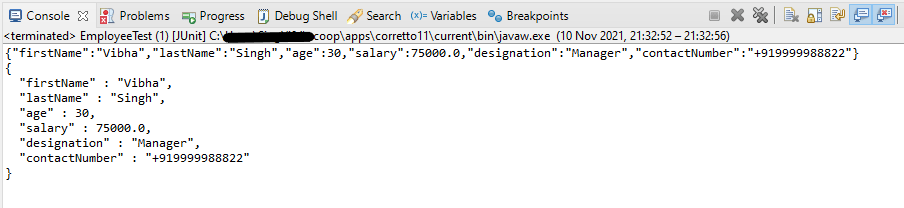
You can see that emailId, gender and maritalStatus are not present in JSON Payload.
Let us see the impact of @JsonIgnoreProperties to the setter or deserialized properties.
Deserialization Test
    @Test
	public void deserializationTest()  {

		String employeeString = "{\r\n"
				+ "  \"firstName\" : \"Deserialization\",\r\n"
				+ "  \"lastName\" : \"Test\",\r\n"
				+ "  \"age\" : 30,\r\n"
				+ "  \"salary\" : 75000.0,\r\n"
				+ "  \"designation\" : \"Manager\",\r\n"
				+ "  \"contactNumber\" : \"+919999988822\",\r\n"
				+ "  \"emailId\" : \"abc@test.com\",\r\n"
				+ "  \"gender\" : \"female\",\r\n"
				+ "  \"maritalStatus\" : \"married\"\r\n"
				+ " }";


		// Converting a JSON Payload to a JAVA Object
		ObjectMapper mapper = new ObjectMapper();
        Employee employee2 = null;

		try {
			employee2 = mapper.readValue(employeeString, Employee.class);
		} catch (JsonMappingException e) {
			e.printStackTrace();
		} catch (JsonProcessingException e) {
			e.printStackTrace();
		}

		System.out.println("First Name of employee : " + employee2.getFirstName());
		System.out.println("Last Name of employee : " + employee2.getLastName());
		System.out.println("Age of employee : " + employee2.getAge());
		System.out.println("Salary of employee : " + employee2.getSalary());
		System.out.println("Designation of employee : " + employee2.getDesignation());
		System.out.println("Contact Number of employee : " + employee2.getContactNumber());
		System.out.println("EmailId of employee : " + employee2.getEmailId());
		System.out.println("Marital Status of employee : " + employee2.getMaritalStatus());
		System.out.println("Gender of employee : " + employee2.getGender());

	}
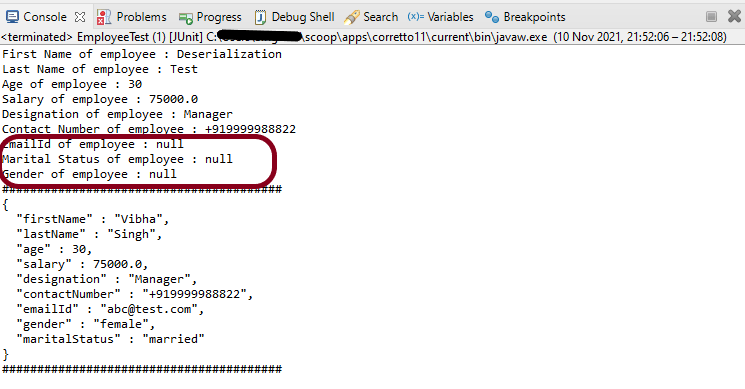
Output

You can see that emailId, gender and maritalStatus – the values present in JSON for all of them are ignored and default values are retrieved.
POJO with allowGetters
allowGetters are enabled to allow “getters” to be used. This is commonly set to support defining “read-only” properties; ones for which there is a getter, but no matching setter: in this case, properties should be ignored for deserialization but NOT serialization. Another way to think about this setting is that setting it to `true` will “disable” ignoring of getters.
Default value is `false`, which means that getters with matching names will be ignored.
In the below example, I have defined emailId, gender and maritalStatus as allowGetters as True.
public class EmployeeTest {

	@Test
	public void serializationTest()  {

		Employee employee = new Employee();
		employee.setFirstName("Vibha");
		employee.setLastName("Singh");
		employee.setAge(30);
		employee.setSalary(75000);
		employee.setDesignation("Manager");
		employee.setContactNumber("+919999988822");
		employee.setEmailId("abc@test.com");
		employee.setMaritalStatus("married");
		employee.setGender("female");

		// Converting a Java class object to a JSON payload as string
		ObjectMapper mapper = new ObjectMapper();

        try {
			String employeePrettyJson = mapper.writerWithDefaultPrettyPrinter().writeValueAsString(employee);
			System.out.println(employeePrettyJson);
		} catch (JsonProcessingException e) {
			e.printStackTrace();
		}

	}

	@Test
	public void deserializationTest() {

		String employeeString = "{\r\n"
				+ "  \"firstName\" : \"Deserialization\",\r\n"
				+ "  \"lastName\" : \"Test\",\r\n"
				+ "  \"age\" : 30,\r\n"
				+ "  \"salary\" : 75000.0,\r\n"
				+ "  \"designation\" : \"Manager\",\r\n"
				+ "  \"contactNumber\" : \"+919999988822\",\r\n"
				+ "  \"emailId\" : \"abc@test.com\",\r\n"
				+ "  \"gender\" : \"female\",\r\n"
				+ "  \"maritalStatus\" : \"married\"\r\n"
				+ " }";


		// Converting a JSON Payload to a JAVA Object
		ObjectMapper mapper = new ObjectMapper();

		 Employee employee2 = null;

		try {
			employee2 = mapper.readValue(employeeString, Employee.class);
		} catch (JsonMappingException e) {
			e.printStackTrace();
		} catch (JsonProcessingException e) {
			e.printStackTrace();
		}

		System.out.println("First Name of employee : " + employee2.getFirstName());
		System.out.println("Last Name of employee : " + employee2.getLastName());
		System.out.println("Age of employee : " + employee2.getAge());
		System.out.println("Salary of employee : " + employee2.getSalary());
		System.out.println("Designation of employee : " + employee2.getDesignation());
		System.out.println("Contact Number of employee : " + employee2.getContactNumber());
		System.out.println("EmailId of employee : " + employee2.getEmailId());
		System.out.println("Marital Status of employee : " + employee2.getMaritalStatus());
		System.out.println("Gender of employee : " + employee2.getGender());

	}

}
Output
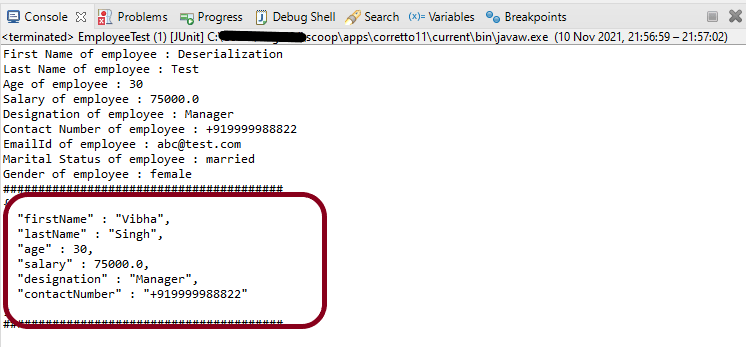
In the below image, it shows that values of emailId, gender and maritalStatus are ignored and default value is passed.
POJO with allowSetters
allowSetters – Property that can be enabled to allow “setters” to be used. This could be used to specify “write-only” properties; ones that should not be serialized out, but that may be provided in for deserialization. Another way to think about this setting is that setting it to `true` will “disable” ignoring of setters.
Default value is `false`, which means that setters with matching names will be ignored.
public class EmployeeTest {

	@Test
	public void serializationTest() {

		Employee employee = new Employee();
		employee.setFirstName("Vibha");
		employee.setLastName("Singh");
		employee.setAge(30);
		employee.setSalary(75000);
		employee.setDesignation("Manager");
		employee.setContactNumber("+919999988822");
		employee.setEmailId("abc@test.com");
		employee.setMaritalStatus("married");
		employee.setGender("female");

		// Converting a Java class object to a JSON payload as string
		ObjectMapper mapper = new ObjectMapper();
		try {
			String employeePrettyJson = mapper.writerWithDefaultPrettyPrinter().writeValueAsString(employee);
			System.out.println(employeePrettyJson);
		} catch (JsonProcessingException e) {
			e.printStackTrace();
		}
		System.out.println("########################################");
	}

	@Test
	public void deserializationTest()  {

		String employeeString = "{\r\n"
				+ "  \"firstName\" : \"Deserialization\",\r\n"
				+ "  \"lastName\" : \"Test\",\r\n"
				+ "  \"age\" : 30,\r\n"
				+ "  \"salary\" : 75000.0,\r\n"
				+ "  \"designation\" : \"Manager\",\r\n"
				+ "  \"contactNumber\" : \"+919999988822\",\r\n"
				+ "  \"emailId\" : \"abc@test.com\",\r\n"
				+ "  \"gender\" : \"female\",\r\n"
				+ "  \"maritalStatus\" : \"married\"\r\n"
				+ " }";


		// Converting a JSON Payload to a JAVA Object
		ObjectMapper mapper = new ObjectMapper();

		 Employee employee2 = null;

		try {
			employee2 = mapper.readValue(employeeString, Employee.class);
		} catch (JsonMappingException e) {
			e.printStackTrace();
		} catch (JsonProcessingException e) {
			e.printStackTrace();
		}

		System.out.println("First Name of employee : " + employee2.getFirstName());
		System.out.println("Last Name of employee : " + employee2.getLastName());
		System.out.println("Age of employee : " + employee2.getAge());
		System.out.println("Salary of employee : " + employee2.getSalary());
		System.out.println("Designation of employee : " + employee2.getDesignation());
		System.out.println("Contact Number of employee : " + employee2.getContactNumber());
		System.out.println("EmailId of employee : " + employee2.getEmailId());
		System.out.println("Marital Status of employee : " + employee2.getMaritalStatus());
		System.out.println("Gender of employee : " + employee2.getGender());

		System.out.println("########################################");

	}

}
Output
We are done! Congratulations on making it through this tutorial and hope you found it useful! Happy Learning!!
This tutorial will show how to ignore certain fields when serializing an object to JSON using Jackson 2.x.
This is very useful when the Jackson defaults aren’t enough, and we need to control exactly what gets serialized to JSON – and there are several ways to ignore properties. One of the most common ways is the use of @JsonIgnore Annotation.
To start off, add Jackson’s databind dependency to the project. Always add the latest dependency to your project.
<dependency>
    <groupId>com.fasterxml.jackson.core</groupId>
    <artifactId>jackson-databind</artifactId>
    <version>2.13.0</version>
</dependency>
@JsonIgnore is used at field level to mark a property or list of properties to be ignored.
The Jackson’s @JsonIgnore annotation can be placed on fields, getters/setters and constructor parameters mark a property to be ignored during the serialization to JSON (or deserialization from JSON). If @JsonIgnore is the only annotation associated with a property, it will also cause the whole property to be ignored: that is, if setter has this annotation and getter has no annotations, the getter is also effectively ignored.
Let us have an Employee JSON as shown below.
{
  "firstName" : "Vibha",
  "lastName" : "Singh",
  "age" : 30,
  "salary" : 75000.0,
  "designation" : "Manager",
  "contactNumber" : "+919999988822",
  "emailId" : "abc@test.com",
  "gender" : "female",
  "maritalStatus" : "married"
}
To learn about Serialization and Deserialization of a JSON Object using Jackson API, refer to this
To create a POJO of the above JSON, we need to create a class with the name Employee. Create private data members corresponding to these JSON nodes, and then create the corresponding getter and setter methods.
Here, I have assigned emailId and gender as @JsonIgnore.
public class Employee {

	// private variables or data members of pojo class
	private String firstName;
	private String lastName;
	private int age;
	private double salary;
	private String designation;
	private String contactNumber;

	@JsonIgnore
	private String emailId;

	@JsonIgnore
	private String gender;

	private String maritalStatus;

	// Getter and setter methods
	public String getFirstName() {
		return firstName;
	}

	public void setFirstName(String firstName) {
		this.firstName = firstName;
	}

	public String getLastName() {
		return lastName;
	}

	public void setLastName(String lastName) {
		this.lastName = lastName;
	}

	public int getAge() {
		return age;
	}

	public void setAge(int age) {
		this.age = age;
	}

	public double getSalary() {
		return salary;
	}

	public void setSalary(double salary) {
		this.salary = salary;
	}

	public String getDesignation() {
		return designation;
	}

	public void setDesignation(String designation) {
		this.designation = designation;
	}

	public String getContactNumber() {
		return contactNumber;
	}

	public void setContactNumber(String contactNumber) {
		this.contactNumber = contactNumber;
	}

	public String getEmailId() {
		return emailId;
	}

	public void setEmailId(String emailId) {
		this.emailId = emailId;
	}

	public String getGender() {
		return gender;
	}

	public void setGender(String gender) {
		this.gender = gender;
	}

	public String getMaritalStatus() {
		return maritalStatus;
	}

	public void setMaritalStatus(String maritalStatus) {
		this.maritalStatus = maritalStatus;
	}

}
Now, let us create a SerializationTest with the above-mentioned POJO.
	@Test
	public void serializationTest() {

		Employee employee = new Employee();
		employee.setFirstName("Vibha");
		employee.setLastName("Singh");
		employee.setAge(30);
		employee.setSalary(75000);
		employee.setDesignation("Manager");
		employee.setContactNumber("+919999988822");
		employee.setEmailId("abc@test.com");
		employee.setMaritalStatus("married");
		employee.setGender("female");

		// Converting a Java class object to a JSON payload as string
		ObjectMapper mapper = new ObjectMapper();

		try {
			String employeePrettyJson = mapper.writerWithDefaultPrettyPrinter().writeValueAsString(employee);
			System.out.println(employeePrettyJson);
		} catch (JsonProcessingException e) {
			e.printStackTrace();
		}

		System.out.println("########################################");

	}
Output

As you can see here that emailId and gender nodes are not present in this JSON payload.
Now, let us see an example of deserialization where nodes that are assigned as @JsonIgnore return null values.
@Test
	public void deserializationTest() throws JsonMappingException, JsonProcessingException  {

		String employeeString = "{\r\n"
				+ "  \"firstName\" : \"Deserialization\",\r\n"
				+ "  \"lastName\" : \"Test\",\r\n"
				+ "  \"age\" : 30,\r\n"
				+ "  \"salary\" : 75000.0,\r\n"
				+ "  \"designation\" : \"Manager\",\r\n"
				+ "  \"contactNumber\" : \"+919999988822\",\r\n"
				+ "  \"emailId\" : \"abc@test.com\",\r\n"
				+ "  \"gender\" : \"female\",\r\n"
				+ "  \"maritalStatus\" : \"married\"\r\n"
				+ " }";


		// Converting a Java class object to a JSON payload as string
		ObjectMapper mapper = new ObjectMapper();

		Employee employee2 = mapper.readValue(employeeString, Employee.class);
		System.out.println("First Name of employee : " + employee2.getFirstName());
		System.out.println("Last Name of employee : " + employee2.getLastName());
		System.out.println("Age of employee : " + employee2.getAge());
		System.out.println("Salary of employee : " + employee2.getSalary());
		System.out.println("Designation of employee : " + employee2.getDesignation());
		System.out.println("Contact Number of employee : " + employee2.getContactNumber());
		System.out.println("EmailId of employee : " + employee2.getEmailId());
		System.out.println("Marital Status of employee : " + employee2.getMaritalStatus());
		System.out.println("Gender of employee : " + employee2.getGender());

	}
Output
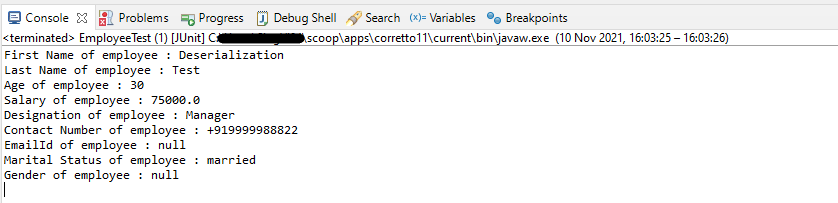
We have values for fields emailId and gender in JSON, but it has not been deserialized as you can see it has default values, not from JSON.
I hope this has helped you to understand @JsonIgnore. Cheers!! Have happy learning!!
This tutorial focuses on the testing of a REST API (with JSON payload). We will use Jackson API to serialize the request.
It is suggested to go through these tutorials to understand about creating a JSON Object Payload using POJO (Plain Old Java Object).
How to create JSON Object Payload using POJO – Jackson API
How to create JSON Array Payload using POJO – Jackson API
How to create Nested JSON Object using POJO – Jackson API
To start with, we need to add Jackson Maven’s Dependency to the POM. Always add the latest version of Jackson dependency to your project.
<dependency>
    <groupId>com.fasterxml.jackson.core</groupId>
    <artifactId>jackson-databind</artifactId>
    <version>2.17.2</version>
</dependency>
The complete POM.xml will look like this, as shown below:
<?xml version="1.0" encoding="UTF-8"?>
<project xmlns="http://maven.apache.org/POM/4.0.0"
         xmlns:xsi="http://www.w3.org/2001/XMLSchema-instance"
         xsi:schemaLocation="http://maven.apache.org/POM/4.0.0 http://maven.apache.org/xsd/maven-4.0.0.xsd">
    <modelVersion>4.0.0</modelVersion>

    <groupId>com.example</groupId>
    <artifactId>RestAssured_JUnit4_Demo</artifactId>
    <version>1.0-SNAPSHOT</version>

    <properties>
        <rest-assured.version>5.3.0</rest-assured.version>
        <junit.version>4.13.2</junit.version>
        <jackson.version>2.17.2</jackson.version>
        <maven.compiler.source>11</maven.compiler.source>
        <maven.compiler.target>11</maven.compiler.target>
    </properties>

    <dependencies>

        <!-- Rest-Assured Dependency -->
        <dependency>
            <groupId>io.rest-assured</groupId>
            <artifactId>rest-assured</artifactId>
            <version>${rest-assured.version}</version>
            <scope>test</scope>
        </dependency>

        <!-- JUnit4 Dependency -->
        <dependency>
            <groupId>junit</groupId>
            <artifactId>junit</artifactId>
            <version>${junit.version}</version>
            <scope>test</scope>
        </dependency>

        <!-- Jackson Dependency -->
        <dependency>
            <groupId>com.fasterxml.jackson.core</groupId>
            <artifactId>jackson-databind</artifactId>
            <version>${jackson.version}</version>
        </dependency>

        <!-- Hamcrest Dependency -->
        <dependency>
            <groupId>org.hamcrest</groupId>
            <artifactId>hamcrest-all</artifactId>
            <version>1.3</version>
            <scope>test</scope>
        </dependency>

    </dependencies>

</project>
This dependency will also transitively add the following libraries to the classpath:
In the below example, let us assume that we need to create a new Employee (POST Request). To start with, we need to create a POJO class of the JSON payload (EmployeeDetails). This POJO class should contain the data members corresponding to the JSON nodes and their corresponding getter and setter methods.
public class EmployeeDetails {

	// private variables or data members of pojo class
	private String name;
	private double salary;
	private int age;

    // Getter and Setters
	public String getName() {
		return name;
	}

	public void setName(String name) {
		this.name = name;
	}

	public double getSalary() {
		return salary;
	}

	public void setSalary(double salary) {
		this.salary = salary;
	}

	public int getAge() {
		return age;
	}

	public void setAge(int age) {
		this.age = age;
	}

}
Now that we have our POJO class, we can start writing some REST Assured Serialization tests!
Let’s start with REST Assured Serialization with JSON. I want to send a POST request to my EmployeeDetails API that will add a new Employee to the database. I will send a POJO of the employee in the request body. This is what the code looks like in the test class:
import com.fasterxml.jackson.core.JsonProcessingException;
import com.fasterxml.jackson.databind.ObjectMapper;
import io.restassured.http.ContentType;
import org.junit.Test;
import static io.restassured.RestAssured.given;
import static org.hamcrest.Matchers.equalTo;

public class EmployeeTests {

    @Test
    public void createEmployee() {

        // Create an object of POJO class
        EmployeeDetails emp = new EmployeeDetails();
        emp.setName("Vibha");
        emp.setSalary(75000);
        emp.setAge(30);

        // Converting a Java class object to a JSON payload as string
        ObjectMapper mapper = new ObjectMapper();
        String employeePrettyJson = null;
        try {
            employeePrettyJson = mapper.writerWithDefaultPrettyPrinter().writeValueAsString(emp);
        } catch (JsonProcessingException e) {
            e.printStackTrace();
        }
        System.out.println("Request");
        System.out.println(employeePrettyJson);
        System.out.println("=========================================");
        System.out.println("Response");

        // GIVEN
        given().baseUri("https://dummy.restapiexample.com/api").contentType(ContentType.JSON).body(emp)

                // WHEN
                .when().post("/v1/create")

                // THEN
                .then().assertThat().statusCode(200).body("data.name", equalTo("Vibha"))
                .body("message", equalTo("Successfully! Record has been added.")).log().body();

    }

}
The output of the above program is
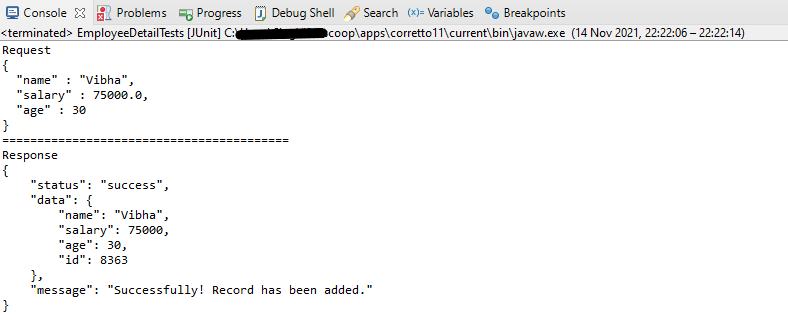
If you want to see the structure of the Request, then add the below in the test code.
ObjectMapper mapper = new ObjectMapper();
String employeePrettyJson = mapper.writerWithDefaultPrettyPrinter().writeValueAsString(emp);
System.out.println(employeePrettyJson);
REST Assured Serialization with Jackson handled all the serialization work for us. Great! See, this has become so simple with the help of Jackson API.
We are done! Congratulations on making it through this tutorial and hope you found it useful! Happy Learning!!
 QA Automation Expert