Mastering CSV File Handling in Java with OpenCSV

HOME

<dependency>
            <groupId>com.opencsv</groupId>
            <artifactId>opencsv</artifactId>
            <version>5.10</version>
</dependency>

// https://mvnrepository.com/artifact/com.opencsv/opencsv
implementation group: 'com.opencsv', name: 'opencsv', version: '5.10'

  FileReader fileReader = new FileReader(filePath);
CSVReader csvReader = new CSVReader(fileReader);
List<String[]> records = csvReader.readAll();
  for (String[] record : records) {
                for (String field : record) {
                    System.out.print(field + " ");
                }
                System.out.println();
         }

package org.example;

import com.opencsv.CSVReader;
import com.opencsv.exceptions.CsvException;

import java.io.FileReader;
import java.io.IOException;
import java.util.List;

public class CSVReader_Demo {

    public static void main(String[] args) {

        String filePath = "C:\\Users\\Documents\\csv_test.csv";

        try {

            FileReader fileReader = new FileReader(filePath);
            CSVReader csvReader = new CSVReader(fileReader);
            List<String[]> records = csvReader.readAll();
            for (String[] record : records) {
                for (String field : record) {
                    System.out.print(field + " ");
                }
                System.out.println();
            }
        } catch (IOException | CsvException e) {
            System.err.println("Error reading CSV file: " + e.getMessage());
        }
    }
}

CSVReader csvReader = new CSVReaderBuilder(fileReader)
                    .withSkipLines(1)
                    .build();

package org.example;

import com.opencsv.CSVReader;
import com.opencsv.CSVReaderBuilder;
import com.opencsv.exceptions.CsvException;

import java.io.FileReader;
import java.io.IOException;
import java.util.List;

public class CSVReader_LineSkip_Demo {

    public static void main(String[] args) {

        String filePath = "C:\\Users\\Documents\\csv_test.csv";

        try {
            FileReader fileReader = new FileReader(filePath);
            CSVReader csvReader = new CSVReaderBuilder(fileReader)
                    .withSkipLines(1)
                    .build();

            List<String[]> records = csvReader.readAll();
            for (String[] record : records) {
                for (String field : record) {
                    System.out.print(field + " ");
                }
                System.out.println();
            }
        } catch (IOException | CsvException e) {
            System.err.println("Error reading CSV file: " + e.getMessage());
        }
    }
}

CSVParser csvParser = new CSVParserBuilder().withSeparator(',').build();
CSVReader csvReader = new CSVReaderBuilder(fileReader).withCSVParser(csvParser).build();
package org.example;

import com.opencsv.CSVParser;
import com.opencsv.CSVParserBuilder;
import com.opencsv.CSVReader;
import com.opencsv.CSVReaderBuilder;
import com.opencsv.exceptions.CsvException;

import java.io.FileReader;
import java.io.IOException;
import java.util.List;

public class CSVReader_Seperator_Demo {

    public static void main(String[] args) {

        String filePath = "C:\\Users\\Documents\\csv_test.csv";

        try {
            FileReader fileReader = new FileReader(filePath);
            CSVParser csvParser = new CSVParserBuilder().withSeparator(',').build();
            CSVReader csvReader = new CSVReaderBuilder(fileReader).withCSVParser(csvParser).build();

            List<String[]> records = csvReader.readAll();
            for (String[] record : records) {
                for (String field : record) {
                    System.out.print(field + " ");
                }
                System.out.println();
            }
        } catch (IOException | CsvException e) {
            System.err.println("Error reading CSV file: " + e.getMessage());
        }
    }
}

Step-by-Step HTML Parsing with Jsoup Examples

HOME

Table of Contents

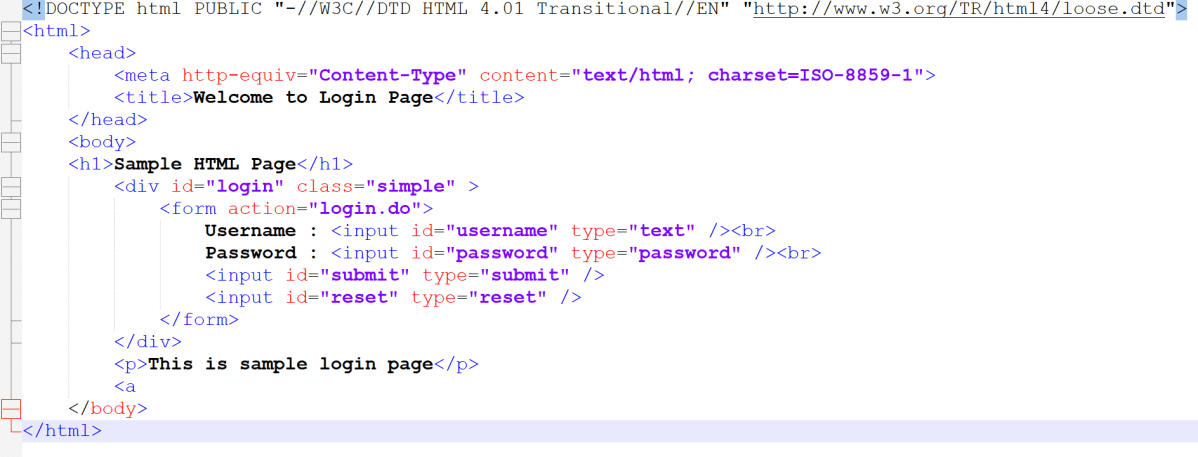
<!DOCTYPE html>
<html>
<head>
    <title>Login Page</title>
</head>
<body>
    <h1>Welcome to My Website</h1>
    <p>This is a paragraph of text.</p>
    <a href="https://qaautomation.expert">Visit QA Automation Expert</a>
</body>
</html>

<dependency>
    <groupId>org.jsoup</groupId>
    <artifactId>jsoup</artifactId>
    <version>1.19.1</version>
</dependency>

// https://mvnrepository.com/artifact/org.jsoup/jsoup
implementation("org.jsoup:jsoup:1.19.1")

package com.example;

import org.jsoup.Jsoup;
import org.jsoup.nodes.Document;

import java.io.File;
import java.io.IOException;

public class Read_HTMLString {

    public static void main(String[] args) {

        String htmlString = "<html><head><title>HTML Scrapping</title></head>"
                + "<body>This page is demo HTML Page. This page is used for web scrapping.</body></html>";
        Document document = Jsoup.parse(htmlString);
        System.out.println("Title : " + document.title());
        System.out.println("Body: " + document.body().text());
    }

String htmlString = "<html><head><title>HTML Scrapping</title></head>"
                + "<body>This page is demo HTML Page. This page is used for web scrapping.</body></html>";

Document document = Jsoup.parse(htmlString);
System.out.println("Title : " + document.title());
System.out.println("Body: " + document.body().text());

package com.example;

import org.jsoup.Jsoup;
import org.jsoup.nodes.Document;

import java.io.File;
import java.io.IOException;

public class Read_HTMLFile {

    public static void main(String args[]) {
        Document document = null;
        try {
            document = Jsoup.parse(new File("C:\\Users\\vibha\\OneDrive\\Desktop\\Login.html"), "ISO-8859-1");
        } catch (IOException e) {
            e.printStackTrace();
        }

        String title = document.title();
        String divClass = document.getElementById("login").className();

        System.out.println("Jsoup can also parse HTML file directly");
        System.out.println("Title : " + title);
        System.out.println("Class of div tag : " + divClass);
        System.out.println("Heading: " + document.select("h1").text());
        System.out.println("Paragraph: " + document.select("p").text());
    }
}

document = Jsoup.parse(new File("C:\\Users\\vibha\\OneDrive\\Desktop\\Login.html"), "ISO-8859-1");
String divClass = document.getElementById("login").className();
System.out.println("Heading: " + document.select("h1").text());

package com.example;

import org.jsoup.Jsoup;
import org.jsoup.nodes.Document;
import org.jsoup.nodes.Element;
import org.jsoup.select.Elements;

import java.io.File;
import java.io.IOException;

public class Read_URL {

    public static void main(String[] args) throws IOException {
        String url = "http://qaautomation.expert";
        Document document = Jsoup.connect(url).get();
        System.out.println("Title: " + document.title());

        Elements links = document.select("a[href]"); // Select all <a> tags with href attribute
        for (Element link : links) {
            System.out.println("Link: " + link.attr("href"));
            System.out.println("Text: " + link.text());
        }
    }

}

 Document document = Jsoup.connect(url).get();
System.out.println("Title: " + document.title());
Elements links = document.select("a[href]");

How to decode JWT Token with Auth0 in Java

HOME

 {
    "typ":"JWT",
    "alg":"HS256"
 }
{
  "sub":"test",
  "roles":"ROLE_ADMIN",
  "iss":"myself",
  "exp":1471086381
}
HASHINGALGO( base64UrlEncode(header) + “.” + base64UrlEncode(payload),secret)
eyJhbGciOiJIUzI1NiJ9.eyJzdWIiOiJ0ZXN0Iiwicm9sZXMiOiJST0xFX0FETUlOIiwiaXNzIjoibXlzZWxmIiwiZXhwIjoxNDcxMDg2MzgxfQ.1EI2haSz9aMsHjFUXNVz2Z4mtC0nMdZo6bo3-x-aRpw
 <dependency>
      <groupId>com.auth0</groupId>
      <artifactId>java-jwt</artifactId>
      <version>4.4.0</version>
 </dependency>

DecodedJWT decodedJWT = JWT.decode(jwtToken);
String header = decodedJWT.getHeader();
String payload = decodedJWT.getPayload();
String signature = decodedJWT.getSignature();
String subject = decodedJWT.getSubject();
String issuer = decodedJWT.getIssuer();
String decodedHeader = new String(java.util.Base64.getUrlDecoder().decode(header));
String decodedPayload = new String(java.util.Base64.getUrlDecoder().decode(payload));
package com.example.JWT;
import com.auth0.jwt.JWT;
import com.auth0.jwt.interfaces.DecodedJWT;

public class JWTAuth0Decoder {

    public static void main(String[] args) {

        String jwtToken = "eyJhbGciOiJIUzI1NiJ9.eyJzdWIiOiJ0ZXN0Iiwicm9sZXMiOiJST0xFX0FETUlOIiwiaXNzIjoibXlzZWxmIiwiZXhwIjoxNDcxMDg2MzgxfQ.1EI2haSz9aMsHjFUXNVz2Z4mtC0nMdZo6bo3-x-aRpw";
        DecodedJWT decodedJWT = JWT.decode(jwtToken);

        // Retrieve header, payload, and signature
        String header = decodedJWT.getHeader();
        String payload = decodedJWT.getPayload();
        String signature = decodedJWT.getSignature();
        String subject = decodedJWT.getSubject();
        String issuer = decodedJWT.getIssuer();

        // Print each component
        System.out.println("Header (Base64): " + header);
        System.out.println("Payload (Base64): " + payload);
        System.out.println("Signature: " + signature);
        System.out.println("Subject: " + subject);
        System.out.println("Issuer: " + issuer);

        String decodedHeader = new String(java.util.Base64.getUrlDecoder().decode(header));
        String decodedPayload = new String(java.util.Base64.getUrlDecoder().decode(payload));

        System.out.println(" ****************** Decoded Values ******************* ");
        System.out.println("Decoded Header: " + decodedHeader);
        System.out.println("Decoded Payload: " + decodedPayload);

    }
}

Creating JWT with Auth0 in Java

HOME

 {
    "typ":"JWT",
    "alg":"HS256"
 }
{
  "iss": "QA_Automation",
  "sub": "QA_Automation Details",
  "userId": "9821",
  "roles": "ROLE_ADMIN",
  "scope": "read write",
  "iat": 1680000000,
  "exp": 1680000100,
  "jti": "uuid-guid",
  "nbf": 1680000001
}
HASHINGALGO( base64UrlEncode(header) + “.” + base64UrlEncode(payload),secret)
 <dependency>
      <groupId>com.auth0</groupId>
      <artifactId>java-jwt</artifactId>
      <version>4.4.0</version>
 </dependency>

Algorithm algorithm = Algorithm.HMAC256("qa-automation-expert-details");
.withIssuer("QA_Automation")
.withSubject("QA_Automation Details")
.withClaim("userId", "9821")
.withClaim("roles", "ROLE_ADMIN")
.withClaim("scope", "read write")
 .withIssuedAt(new Date())
 .withExpiresAt(new Date(System.currentTimeMillis() + 10000L))
.withJWTId(UUID.randomUUID().toString())
.withNotBefore(new Date(System.currentTimeMillis() + 100L))
.sign(algorithm);

import com.auth0.jwt.JWT;
import com.auth0.jwt.JWTVerifier;
import com.auth0.jwt.algorithms.Algorithm;
import com.auth0.jwt.exceptions.JWTVerificationException;
import com.auth0.jwt.interfaces.Claim;
import com.auth0.jwt.interfaces.DecodedJWT;
import java.util.Date;
import java.util.UUID;

public class JWTTokenGenerator {

    public static void main(String[] args) {

        Algorithm algorithm = Algorithm.HMAC256("qa-automation-expert-details");

        String jwtToken = JWT.create()
                .withIssuer("QA_Automation")
                .withSubject("QA_Automation Details")
                .withClaim("userId", "9821")
                .withClaim("roles", "ROLE_ADMIN")
                .withClaim("scope", "read write")
                .withIssuedAt(new Date())
                .withExpiresAt(new Date(System.currentTimeMillis() + 10000L))
                .withJWTId(UUID.randomUUID()
                        .toString())
                .withNotBefore(new Date(System.currentTimeMillis() + 100L))
                .sign(algorithm);

        System.out.println("jwtToken :" + jwtToken);
    }

}

Change Font Style in Excel with Apache POI

HOME

<!-- POI -->
    <dependency>
      <groupId>org.apache.poi</groupId>
      <artifactId>poi</artifactId>
      <version>5.3.0</version>
    </dependency>

    <!-- POI XML -->
    <dependency>
      <groupId>org.apache.poi</groupId>
      <artifactId>poi-ooxml</artifactId>
      <version>5.3.0</version>
    </dependency>
Font font = workbook.createFont();
XSSFWorkbook workbook = newXSSFWorkbook();
XSSFSheet sheet = workbook.createSheet("Example_Sheet");
 Row row = sheet.createRow(0);
Cell cell = row.createCell(0);
cell.setCellValue("Happy Days");
Font font = workbook.createFont();
font.setFontHeightInPoints((short) 24);
font.setFontName("Arial");
font.setBold(true);
font.setItalic(true);
font.setColor(IndexedColors.DARK_RED.getIndex());
font.setUnderline(Font.U_SINGLE);
CellStyle style = workbook.createCellStyle();
style.setFont(font);
cell.setCellStyle(style);
 try {
            FileOutputStream outputStream = new FileOutputStream("src/test/StyledCell.xlsx");
            workbook.write(outputStream);
            outputStream.close();
            System.out.println("StyledCell.xlsx Workbook is successfully created");
        } catch (IOException e) {
            e.printStackTrace();
        } finally {
            workbook.close();
        }

package com.example.Excel;

import org.apache.poi.ss.usermodel.*;
import org.apache.poi.xssf.usermodel.XSSFSheet;
import org.apache.poi.xssf.usermodel.XSSFWorkbook;

import java.io.FileOutputStream;
import java.io.IOException;

public class ApplyFont_Excel {

    public static void main(String[] args) throws IOException {

        // create blank workbook
        XSSFWorkbook workbook = new XSSFWorkbook();

        // Create a blank sheet
        XSSFSheet sheet = workbook.createSheet("Example_Sheet");

        //Create a row
        Row row = sheet.createRow(0);

        //Create a cell
        Cell cell = row.createCell(0);

        //Set the value of the cell
        cell.setCellValue("Happy Days");

        //Create a new font
        Font font = workbook.createFont();
        font.setFontHeightInPoints((short) 24);
        font.setFontName("Arial");
        font.setBold(true);
        font.setItalic(true);
        font.setColor(IndexedColors.DARK_RED.getIndex());
        font.setUnderline(Font.U_SINGLE);

        //Create a cell style and set the font
        CellStyle style = workbook.createCellStyle();
        style.setFont(font);

        //Apply the style to the cell
        cell.setCellStyle(style);

        //Write the output to the file
        try {
            FileOutputStream outputStream = new FileOutputStream("src/test/StyledCell.xlsx");
            workbook.write(outputStream);
            outputStream.close();
            System.out.println("StyledCell.xlsx Workbook is successfully created");
        } catch (IOException e) {
            e.printStackTrace();
        } finally {
            workbook.close();
        }

    }
}

package com.example.Excel;

import org.apache.poi.ss.usermodel.*;
import org.apache.poi.xssf.usermodel.XSSFSheet;
import org.apache.poi.xssf.usermodel.XSSFWorkbook;

import java.io.FileOutputStream;
import java.io.IOException;

public class ApplyFontMultipleRows_Excel {

    public static void main(String[] args) throws IOException {

        // create blank workbook
        XSSFWorkbook workbook = new XSSFWorkbook();

        // Create a blank sheet
        XSSFSheet sheet = workbook.createSheet("Example_Sheet");

        //Create a new font1
        Font font1 = workbook.createFont();
        font1.setFontHeightInPoints((short) 12);
        font1.setFontName("Arial");
        font1.setBold(true);
        font1.setItalic(true);
        font1.setColor(IndexedColors.DARK_RED.getIndex());
        font1.setUnderline(Font.U_SINGLE);

        //Create a new font2
        Font font2 = workbook.createFont();
        font2.setFontHeightInPoints((short) 14);
        font2.setFontName("Times New Roman");
        font2.setBold(true);
        font2.setItalic(true);
        font2.setColor(IndexedColors.BLUE.getIndex());

        //Create a new font3
        Font font3 = workbook.createFont();
        font3.setFontHeightInPoints((short) 16);
        font3.setFontName("Courier New");
        font3.setBold(true);
        font3.setColor(IndexedColors.GREEN.getIndex());

        //Create a cell style and set the font
        CellStyle style1 = workbook.createCellStyle();
        style1.setFont(font1);

        CellStyle style2 = workbook.createCellStyle();
        style2.setFont(font2);

        CellStyle style3 = workbook.createCellStyle();
        style3.setFont(font3);

        // Apply styles to rows
        Row row1 = sheet.createRow(0);
        Cell cell1 = row1.createCell(0);
        cell1.setCellValue("Underlined Italic Bold Arial");
        cell1.setCellStyle(style1);

        Row row2 = sheet.createRow(1);
        Cell cell2 = row2.createCell(0);
        cell2.setCellValue("Bold Italic Times New Roman");
        cell2.setCellStyle(style2);

        Row row3 = sheet.createRow(2);
        Cell cell3 = row3.createCell(0);
        cell3.setCellValue("Courier New");
        cell3.setCellStyle(style3);

        //Write the output to the file
        try {
            FileOutputStream outputStream = new FileOutputStream("src/test/FontStyle.xlsx");
            workbook.write(outputStream);
            outputStream.close();
            System.out.println("Workbook FontStyle.xlsx is created");
        } catch (IOException e) {
            e.printStackTrace();
        } finally {
            workbook.close();
        }

    }
}

How to Write Data to Excel File in Java using Apache POI

HOME

This tutorial describes the steps to write data in Excel file in Java.

I’m using Apache POI to write data to the excel file. To download and install Apache POI, refer here.

In the previous tutorial, I have explained How to read data from Excel in Java.

Dependency:

If you are using maven, then you need to add below dependency in pom.xml.

<dependency>
    <groupId>org.apache.poi</groupId>
    <artifactId>poi</artifactId>
    <version>5.3.0</version>
</dependency>
 
<dependency>
    <groupId>org.apache.poi</groupId>
    <artifactId>poi-ooxml</artifactId>
    <version>5.3.0</version>
</dependency>

Here are few classes which you need to aware of.

  • WorkbookThis is high level class for representing excel workbook.
  • SheetThis is high level class for representing excel sheet.
  • RowThis is high level class for representing excel row. It has methods which are related to row.
  • CellThis is high level class for representing individual excel cell. It has methods which are related to cell for example : getDataType().

The basic steps for writing data into an excel file using Apache POI API are given below:

Step 1 – Create a blank workbook.

XSSFWorkbook wb = new XSSFWorkbook();

Step 2 Import XSSFWorkbook from package.

import org.apache.poi.xssf.usermodel.XSSFWorkbook;

Step 3 Create a sheet and pass name of the sheet.

XSSFSheet sheet = workbook.createSheet("Write_TestData");

Step 4 Import XSSFSheet from package.

import org.apache.poi.xssf.usermodel.XSSFSheet;
ArrayList<Object[]> data = new ArrayList<Object[]>();
		data.add(new String[] { "Name", "Id", "Salary" });
		data.add(new Object[] { "Jim", "001A", 10000 });
		data.add(new Object[] { "Jack", "1001B", 40000 });
		data.add(new Object[] { "Tim", "2001C", 20000 });
		data.add(new Object[] { "Gina", "1004S", 30000 });

Step 6 – Create a Row. A spreadsheet consists of rows and cells. It has a grid layout.

 XSSFRow row = sheet.createRow(rownum++);

Step 7 – Import XSSFRow from package

import org.apache.poi.xssf.usermodel.XSSFRow;

Step 8 Create cells in a row. A row is a collection of cells. When you enter data in the sheet, it is always stored in the cell.

 XSSFCell cell = row.createCell(cellnum++);

Step 9 – Import XSSFCell from package.

 XSSFCell cell = row.createCell(cellnum++);
	int rownum = 0;
		for (Object[] employeeDetails : data) {

			// Create Row
			XSSFRow row = sheet.createRow(rownum++);

			int cellnum = 0;
			for (Object obj : employeeDetails) {

				// Create cell
				XSSFCell cell = row.createCell(cellnum++);

				// Set value to cell
				if (obj instanceof String)
					cell.setCellValue((String) obj);
				else if (obj instanceof Double)
					cell.setCellValue((Double) obj);
				else if (obj instanceof Integer)
					cell.setCellValue((Integer) obj);
			}
		}

Step 11 – Open a FileOutputStream to a new file named “EmployeeDetails.xlsx”. Write data to an OutputStream. Use the below code to write output stream.

FileOutputStream out = new FileOutputStream(new File("EmployeeDetails.xlsx"));
workbook.write(out);

Step 12 – Close the output stream.

out.close();

Below is the sample code for writing the data in an excel in Java.

import java.io.File;
import java.io.FileOutputStream;
import java.io.IOException;
import java.util.ArrayList;

import org.apache.poi.xssf.usermodel.XSSFCell;
import org.apache.poi.xssf.usermodel.XSSFRow;
import org.apache.poi.xssf.usermodel.XSSFSheet;
import org.apache.poi.xssf.usermodel.XSSFWorkbook;

public class ReadWriteExcelFile {

	public static void main(String[] args) throws IOException {

		// create blank workbook
		XSSFWorkbook workbook = new XSSFWorkbook();

		// Create a blank sheet
		XSSFSheet sheet = workbook.createSheet("Write_TestData");

		ArrayList<Object[]> data = new ArrayList<Object[]>();
		data.add(new String[] { "Name", "Id", "Salary" });
		data.add(new Object[] { "Jim", "001A", 10000 });
		data.add(new Object[] { "Jack", "1001B", 40000 });
		data.add(new Object[] { "Tim", "2001C", 20000 });
		data.add(new Object[] { "Gina", "1004S", 30000 });

		// Iterate over data and write to sheet
		int rownum = 0;
		for (Object[] employeeDetails : data) {

			// Create Row
			XSSFRow row = sheet.createRow(rownum++);

			int cellnum = 0;
			for (Object obj : employeeDetails) {

				// Create cell
				XSSFCell cell = row.createCell(cellnum++);

				// Set value to cell
				if (obj instanceof String)
					cell.setCellValue((String) obj);
				else if (obj instanceof Double)
					cell.setCellValue((Double) obj);
				else if (obj instanceof Integer)
					cell.setCellValue((Integer) obj);
			}
		}
		try {

			// Write the workbook in file system
			FileOutputStream out = new FileOutputStream(new File("EmployeeDetails.xlsx"));
			workbook.write(out);
			out.close();
			System.out.println("EmployeeDetails.xlsx has been created successfully");
		} catch (Exception e) {
			e.printStackTrace();
		} finally {
			workbook.close();
		}
	}

}

That’s it! We have written data in Excel.

Congratulations on making it through this tutorial and hope you found it useful! Happy Learning!! Cheers!!

Java Excel Tutorial: Creating Excel with Formulas Using Apache POI

HOME

In the previous tutorial, I have explained How to update data in existing excel in Java. In this Java Excel tutorial, I will explain how to create an Excel with formula in a Java program. Excel is very excellent in calculating formulas. The Apache POI library provides excellent support for working with formulas in Excel.

I’m using Apache POI to write data to the excel file. To download and install Apache POI, refer here.

If you are using maven, then you need to add below dependency in pom.xml.

<!-- https://mvnrepository.com/artifact/org.apache.poi/poi -->
<dependency>
    <groupId>org.apache.poi</groupId>
    <artifactId>poi</artifactId>
    <version>5.3.0</version>
</dependency>
  
<!-- https://mvnrepository.com/artifact/org.apache.poi/poi-ooxml -->
<dependency>
    <groupId>org.apache.poi</groupId>
    <artifactId>poi-ooxml</artifactId>
    <version>5.3.0</version>
</dependency>

To know about various Interfaces and Classes in Excel, please refer this link.

Implementation Steps

Step 1 – Create a blank workbook.

XSSFWorkbook workbook = new XSSFWorkbook();

Step 2 Import XSSFWorkbook from package.

import org.apache.poi.xssf.usermodel.XSSFWorkbook;

Step 3 Create a sheet and pass name of the sheet.

XSSFSheet sheet = workbook.createSheet("Calculate Salary");

Step 4 Import XSSFSheet from package.

import org.apache.poi.xssf.usermodel.XSSFSheet;

Step 5 Create a Row. A spreadsheet consists of rows and cells. It has a grid layout. I have created object called Header of XSSFRow.

XSSFRow header = sheet.createRow(0);

Step 6 Below syntax create new cells within the row at index 0 and set a string value for the cell.

header.createCell(0).setCellValue("Employee_Name");

Step 7 Below syntax creates a cell at index 4 and sets formula for cell.

dataRow.createCell(4).setCellFormula("B2+C2+D2");

Step 8 The following line of code sets formula for the cell at the row #1 and column #5 (remember index is 0-based):

In case the column (Cell) does not exist (but the row does), use the following code.

XSSFRow dataRow = sheet.createRow(1);
dataRow.createCell(5).setCellFormula("SUM(B2:C2)");
try {

			// Write the workbook in file system
			FileOutputStream out = new FileOutputStream(new File("Salary_Slip.xlsx"));
			workbook.write(out);
			out.close();
			System.out.println("Excel written successfully.");

		} catch (IOException e) {
			e.printStackTrace();

		}

In the above line, note that you should make sure that the cell at position (1, 5) does exist, otherwise you get a NullPointerException.

Let us see a program where I have created a cell which contains the formula.

import org.apache.poi.xssf.usermodel.XSSFRow;
import org.apache.poi.xssf.usermodel.XSSFSheet;
import org.apache.poi.xssf.usermodel.XSSFWorkbook;

import java.io.File;
import java.io.FileOutputStream;
import java.io.IOException;

public class FormulaExcelDemo {
    
    public static void main(String[] args) {

        // Create object of XSSFWorkbook class
        XSSFWorkbook workbook = new XSSFWorkbook();

        // Create object of XSSFSheet class
        XSSFSheet sheet = workbook.createSheet("Calculate Salary");

        // Create Header row using XSSFRow class
        XSSFRow header = sheet.createRow(0);
        header.createCell(0).setCellValue("Employee_Name");
        header.createCell(1).setCellValue("Base_Salary");
        header.createCell(2).setCellValue("Variable_Pay");
        header.createCell(3).setCellValue("Other_Benefits");
        header.createCell(4).setCellValue("Total Salary");
        header.createCell(5).setCellValue("Base_Variable Salary");

        XSSFRow dataRow = sheet.createRow(1);
        dataRow.createCell(0).setCellValue("George");
        dataRow.createCell(1).setCellValue(5000);
        dataRow.createCell(2).setCellValue(650);
        dataRow.createCell(3).setCellValue(1200);

        // Set formula
        dataRow.createCell(4).setCellFormula("B2+C2+D2");
        dataRow.createCell(5).setCellFormula("SUM(B2:C2)");

        try {

            // Write the workbook in file system
            FileOutputStream out = new FileOutputStream(new File("Salary_Slip.xlsx"));
            workbook.write(out);
            out.close();
            System.out.println("Excel written successfully.");

        } catch (IOException e) {
            e.printStackTrace();

        }
    }
}

That’s it! Well Done! Cheers!!

Congratulations on making it through this tutorial and hope you found it useful! Happy Learning!!

Deleting Directories in Java: Complete Tutorial

HOME

package org.example;

import java.io.File;

public class DeleteDirectoryDemo {

    public static void main(String[] args) {

        String directoryPath = "C:\\Users\\Vibha\\Desktop\\Test";

        //Create a file object for the directory
        File directory = new File(directoryPath);

        if(directory.exists()&& directory.isDirectory()) {
            boolean successful = deleteDirectory(directory);
            if (successful) {
                System.out.println("Directory deleted :" + directoryPath);
            } else {
                System.out.println("Failed to delete Directory :" + directoryPath);
            }
        } else {
            System.out.println("Directory does not exists :" + directoryPath);

            }
        }

        private static boolean deleteDirectory(File directory) {
            File[] allContents = directory.listFiles();

            if (allContents != null) {
                for (File file : allContents) {
                    deleteDirectory(file);
                    System.out.println("File deleted :" + file);
                }
            }
            return directory.delete();
        }
    }

  if(directory.exists()&& directory.isDirectory())
File[] allContents = directory.listFiles();
 for (File file : allContents) {
                    deleteDirectory(file);
                    System.out.println("File deleted :" + file);
                }
            }
directory.delete();

How to insert data in SQL Server using Java

HOME

jdbc:<driver protocol>:<driver connection details>
MS MySql Server - jdbc:odbc:DemoDSN
MySQL - jdbc:mysql://localhost:3306/demodb
Oracle - jdbc:orac;e:thin@myserver:1521:demodb
String dbUrl = "jdbc:mysql://localhost:3306/demo";
String username = "student";
String password = "student1$";

Connection conn = DriverManager.getConnection(dbUrl,username,password)
Statement stmt = conn.createStatement();

 int rowAffected = stmt.executeUpdate(
                    "insert into employees (last_name, first_name, email, department,salary) values ('Singh', 'Vibha','vibha.test@gmail.com', 'QA', 85000)");

<dependencies>
    <dependency>
      <groupId>com.mysql</groupId>
      <artifactId>mysql-connector-j</artifactId>
      <version>8.2.0</version>
</dependency>

package org.example;

import java.sql.*;

public class InsertRow_Demo {
    public static void main(String[] args) throws SQLException {

        Connection conn;
        Statement stmt = null;
        ResultSet result = null;
        ResultSet result1 = null;
        ResultSet result2 = null;

        String dbUrl = "jdbc:mysql://localhost:3306/demo";
        String username = "student";
        String password = "student1$";

        try {
            //Get a connection to database
            conn = DriverManager.getConnection(dbUrl, username, password);

            System.out.println("Database connection is successful\n");

            //Create a statement
            stmt = conn.createStatement();

            System.out.println("Inserting a new employee\n");

            int rowAffected = stmt.executeUpdate(
                    "insert into employees (last_name, first_name, email, department,salary) values ('Singh', 'Vibha','vibha.test@gmail.com', 'QA', 85000)");

            System.out.println("No of rows inserted :" + rowAffected);

            //Execute the SQL Query
            result = stmt.executeQuery("Select * from employees");

            //Process the result set
            while (result.next()) {
                System.out.println("First_Name :" + result.getString("first_name") + " , " + ("Last_Name :" + result.getString("last_name")));

            }


        } catch (Exception e) {
            e.printStackTrace();
        }
    }
}

Java Access Modifiers: Explained with Examples

HOME

There are two types of access modifiers in Java – access modifiers and non-access modifiers.

The access modifier of Java specifies the scope of the variable, method, constructor, or class. We can change the access level of variables, methods, constructors, and classes by applying access modifiers to them.

There are 4 types of access modifiers.

  1. Private: The code is only accessible within the declared class. It cannot be accessed from outside the class.
  2. Default: The code is only accessible in the same package. It cannot be accessed from outside the package. If you do not specify any access level, it will be the default.
  3. Protected: The code is accessible in the same package and subclasses. If you do not make the child class, it cannot be accessed from outside the package.
  4. Public: The class is accessible by any other class. It can be accessed from within the class, outside the class, within the package, and outside the package.

Java Access Modifiers

Private

The private access modifier is accessible only within the class.

In this example, I have created one class – Demo_1 in package Parent_A. It contains a private variable and a private method. We can access private variables and methods within the class.

package Parent_A;

public class Demo_1 {

	private int x = 10; // private variable

	private void display() { // private method
		System.out.println("Display private method");
	}

	public static void main(String[] args) {

		Demo_1 obj1 = new Demo_1();

		System.out.println("Value of X :" + obj1.x);
		obj1.display();
	}

}

In the below example, we have 2 classes – Demo_1 and Demo_2. Class Demo_1 contains private data members and private methods. We are accessing these private members from outside the class, another class Demo_2 so there is a compile-time error.

package Parent_A;

public class Demo_1 {

	private int x = 10; // private variable

	private void display() { // private method
		System.out.println("Display private method");
	}

}
package Parent_A;

public class Demo_2 {

	public static void main(String[] args) {

		Demo_1 obj1 = new Demo_1();
		System.out.println("Value of X :" + obj1.x);
		obj1.display();
	}

}

Private Constructor

In the below example, the private constructor is accessible within the class.

package Parent_A;

public class Demo_1 {
    private int x = 10; // private variable

    private Demo_1() {

        System.out.println("Private Constructor: Value of x : " + x);
    }

    private void display() { // private method
        System.out.println("Display private method");
    }

    public static void main(String[] args) {

        Demo_1 obj1 = new Demo_1();

    }
}

If you make any class constructor private, you cannot create the instance of that class from outside the class.

package Parent_A;

public class Demo_1 {

	private int x = 10; // private variable

	private Demo_1() {

		System.out.println("Private Constructor");
	}

	private void display() { // private method
		System.out.println("Display private method");
	}

}

package Parent_A;

public class Demo_2 {

	public static void main(String[] args) {

		Demo_1 obj1 = new Demo_1();
	}

}

Default

If we don’t use any modifier, it is treated as a default access modifier. The default modifier is accessible only within the package. It cannot be accessed from outside the package. It provides more accessibility than private. But, it is more restrictive than protected and public.

In this example, we have created two classes – Demo_1 and Demo_2 in package – Parent_A. We are accessing the class Demo_2 from within its package, since it is default, so it can be accessed from within the package.

package Parent_A;

public class Demo_1 {

    int x = 10; // default variable

    Demo_1() {

        System.out.println("Default Constructor: Value of x : " + x);
    }

    void display() { // default method
        System.out.println("Display default method");
    }

}

package Parent_A;

public class Demo_2 {

	public static void main(String[] args) {

		Demo_1 obj1 = new Demo_1();
		System.out.println("Value of X :" + obj1.x);
		obj1.display();
	}

}

Protected

The protected access modifier is accessible within the package and outside the package but through inheritance only.

The protected access modifier can be applied to the data member, method, and constructor. It can’t be applied to the class.

In the below example, I have created two packages Parent_A and Parent_B. The class Demo_1 of Parent_A package is public, so can be accessed from outside the package. However the variable, constructor, and method of this package are declared as protected, so it can be accessed from outside the class only through inheritance.

package Parent_A;

public class Demo_1 {
    
    protected  int x = 10; // protected variable

    protected Demo_1() {

        System.out.println("Protected Constructor: Value of x : " + x);
    }

    protected void display() { // protected method
        System.out.println("Display Protected method");
    }

}

package Parent_B;

import Parent_A.Demo_1;

public class Demo_3 extends Demo_1{

    public static void main(String[] args) {

        Demo_3 obj1 = new Demo_3();
        System.out.println("Value of X :" + obj1.x);
        obj1.display();
    }

}

Public

The public access modifier is accessible everywhere. It has the widest scope among all other modifiers.

In the below example, I have created two packages Parent_A and Parent_B. The variable, constructor, and method of this package are declared as public, so it can be accessed from outside the class or outside the package.

package Parent_A;

public class Demo_1 {
    public   int x = 10; // public variable

    public  Demo_1() {

        System.out.println("Public Constructor: Value of x : " + x);
    }

    public  void display() { // public method
        System.out.println("Display Public method");
    }

}

package Parent_B;

import Parent_A.Demo_1;

public class Demo_4 {

    public static void main(String[] args) {

        Demo_1 obj1 = new Demo_1();

        System.out.println("Value of X :" + obj1.x);
        obj1.display();

    }

}