In the previous tutorial, will explain ChainTest Report and its implementation with Selenium with TestNG. In this tutorial, we will discuss the steps to add the screenshot for the failed tests in the ChainTest Report.
The chaintest-core client is the framework component that supports plugins to store embeds for each report. For example, with SimpleGenerator, the client saves all embeds relative to the report file in the resources folder.
Starting chaintest-testng plugin 1.0.5+, screenshots can be attached to tests while the test is in-flight or completing in the @BeforeMethod and @AfterMethod hooks.
@Test
public void testMethod(final Method method) {

//log
  ChainTestListener.log("log example");

  // embed
  ChainTestListener.embed(bytes, "image/png");
}
The complete implementation of ChainTest Report can be found here – Replacement of Extent Report: ChainTest Report with Selenium and TestNG
I have updated the BaseTests and added the implementation of adding the screenshots.
package com.example;

import com.aventstack.chaintest.plugins.ChainTestListener;
import com.aventstack.chaintest.service.ChainPluginService;
import org.openqa.selenium.OutputType;
import org.openqa.selenium.TakesScreenshot;
import org.openqa.selenium.WebDriver;
import org.openqa.selenium.chrome.ChromeDriver;
import org.openqa.selenium.chrome.ChromeOptions;
import org.openqa.selenium.edge.EdgeDriver;
import org.openqa.selenium.edge.EdgeOptions;
import org.openqa.selenium.firefox.FirefoxDriver;
import org.openqa.selenium.firefox.FirefoxOptions;
import org.testng.ITestResult;
import org.testng.annotations.*;

import java.time.Duration;

@Listeners(ChainTestListener.class)
public class BaseTests {

    public static WebDriver driver;
    public final static int TIMEOUT = 10;

    @BeforeTest
    @Parameters("browserName")
    public void setup(String browserName) throws Exception {

        System.out.println("Browser : " + browserName);

        switch (browserName.toLowerCase().trim()) {

            case "chrome":
                ChromeOptions options = new ChromeOptions();
                options.addArguments("--remote-allow-origins=*");
                options.addArguments("--no-sandbox");
                options.addArguments("--disable-dev-shm-usage");
                // options.addArguments("--headless");
                driver = new ChromeDriver(options);
                break;

            case "firefox":
                FirefoxOptions firefoxOptions = new FirefoxOptions();
                driver = new FirefoxDriver(firefoxOptions);
                break;
            case ("edge"):
                EdgeOptions edgeOptions = new EdgeOptions();
                driver = new EdgeDriver(edgeOptions);
                break;

            default:
                System.out.println("Incorrect browser is supplied...." + browserName);
                throw new IllegalArgumentException("WRONG BROWSER : " + browserName);
        }

        driver.manage().window().maximize();
        driver.get("https://the-internet.herokuapp.com/login");
        driver.manage().timeouts().implicitlyWait(Duration.ofSeconds(TIMEOUT));
    }

    @AfterMethod
    public void attachScreenshot(ITestResult result){
        if(!result.isSuccess()){
            ChainTestListener.embed(takeScreenshot(), "image/png");
        }
    }

    public byte[] takeScreenshot(){
        return ((TakesScreenshot)(driver)).getScreenshotAs(OutputType.BYTES);
    }

   @AfterTest
   public void tearDown() {
       driver.quit();
   }

}
How to add logs to the Report?
log is imported from package – import com.aventstack.chaintest.plugins.ChainTestListener;
ChainTestListener.log("Page Title :" + actualLoginPageTitle);
I have updated the LoginPageTests to add the logs also in the report.
package com.example;

import com.aventstack.chaintest.plugins.ChainTestListener;
import org.testng.Assert;
import org.testng.annotations.Test;

public class LoginPageTests extends BaseTests {

    String actualLoginPageTitle;
    String actualErrorMessage;
    String actualSecurePageTitle;

    @Test(priority = 0)
    public void verifyPageTitle() {

        actualLoginPageTitle = driver.getTitle();
        ChainTestListener.log("Page Title :" + actualLoginPageTitle);

        // Verify Page Title
        Assert.assertEquals(actualLoginPageTitle, "The Internet !!");

    }

    @Test(priority = 1)
    public void invalidCredentials() {

        LoginPage loginPage = new LoginPage(driver);
        loginPage.login("tomsmith", "happy!");
        actualErrorMessage = loginPage.getErrorMessage();
        ChainTestListener.log("Error Message :" + actualErrorMessage);

        // Verify Error Message
        Assert.assertTrue(actualErrorMessage.contains("Your password is invalid!"));

    }

    @Test(priority = 2)
    public void validLogin() {

        LoginPage loginPage = new LoginPage(driver);
        loginPage.login("tomsmith", "SuperSecretPassword!");

        SecurePage securePage = new SecurePage(driver);
        actualSecurePageTitle = securePage.getSecurePageTitle();
        ChainTestListener.log("Actual Dashboard Page Title :" + actualSecurePageTitle);

        // Verify Home Page
        Assert.assertTrue(actualSecurePageTitle.contains("You logged into a secure area!"));

    }

}
Execute the tests either using testng.xml or through command line
mvn clean test
The output of the above program is

Open the index.html report and we can see that the failed test has the screenshot attached to it.

Double click on the screenshot attached in the report and we can see the screenshot in the full screen.

Below highlighted ones are the logs mentioned in the LoginPageTests class.
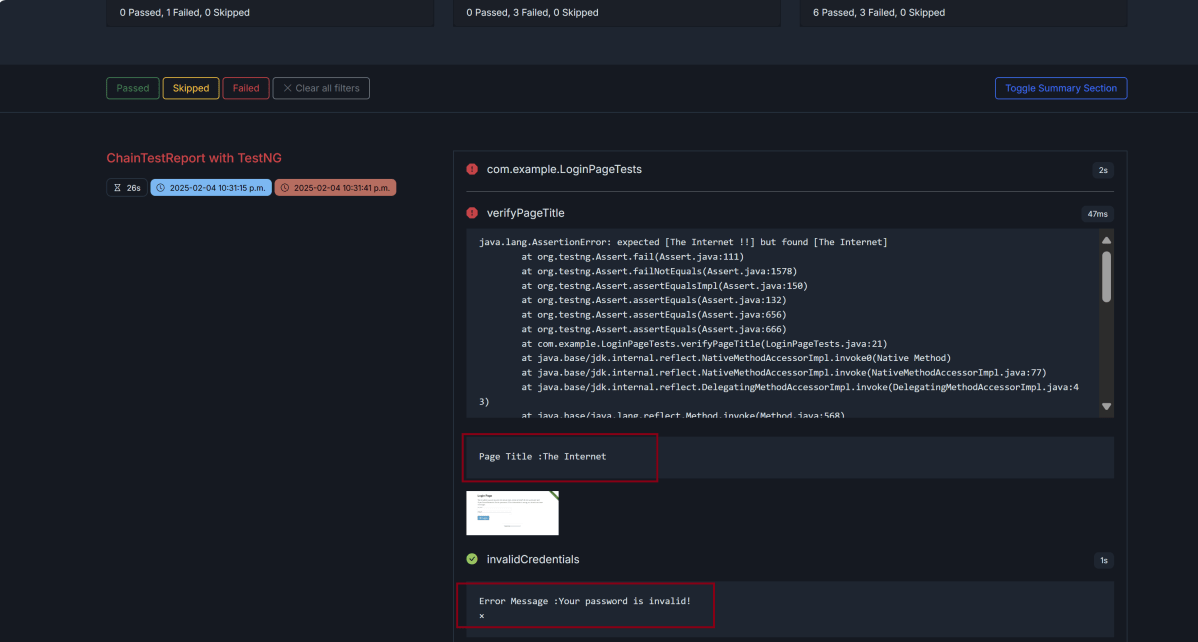
Note:- The addition of screenshots for the failed test as well as the logs are only implemented in index.html report, and not in email.html.
We are done! Congratulations on making it through this tutorial and hope you found it useful! Happy Learning!!
 QA Automation Expert
Hi, is it possible to see the screenshots in the chainlp? or it is just on index.html file?
LikeLike
Yes, it is possible to see the screenshots in the chainlp. This tutorial shows that the scrrenshot of failed test is attached to ChainTest Report in chainlp – Run ChainTest Report on Docker
LikeLike